Controlling Access to the Kubernetes API
Abtout The Controlling Access to the Kubernetes API
更多关于kubernetes的深入文章,请看我csdn或者oschina的博客主页。
-
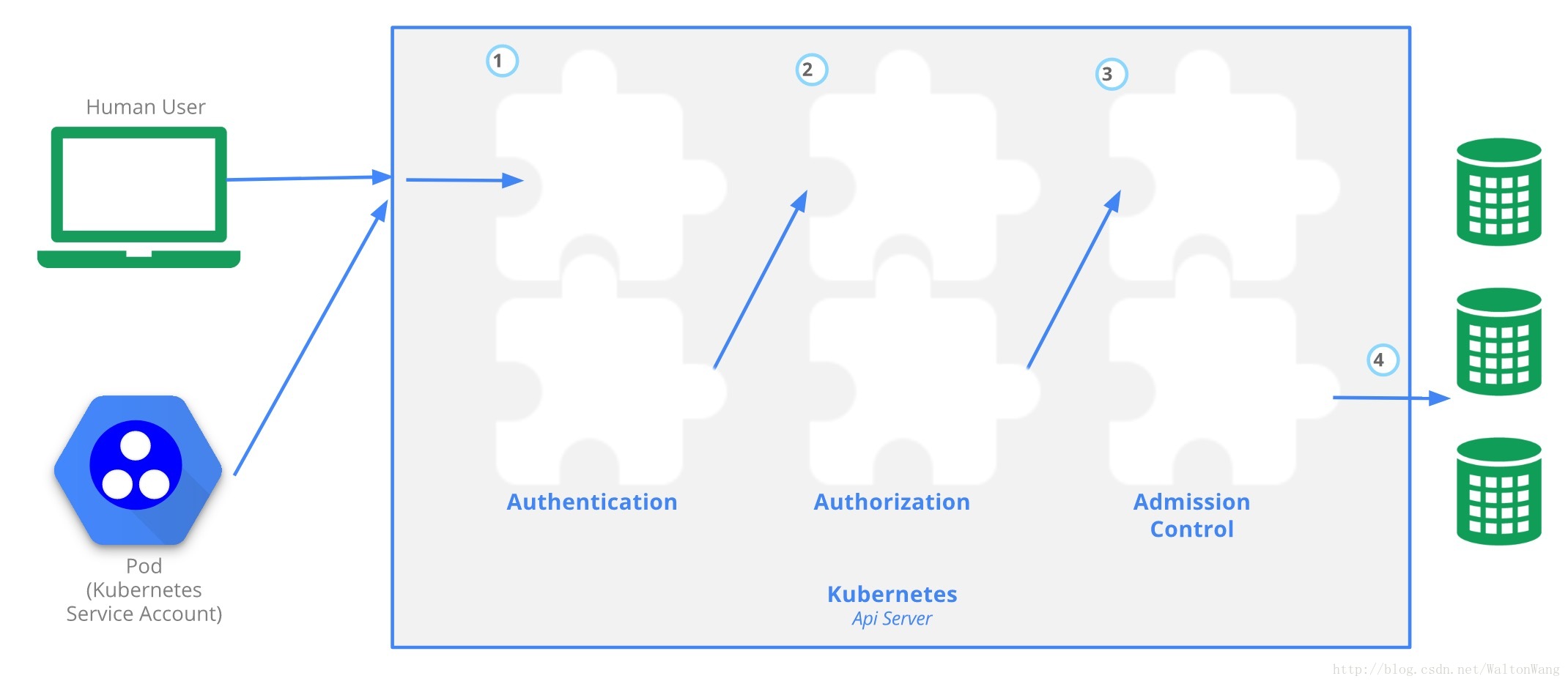
API Server Ports and IPs
By default the Kubernetes API server serves HTTP on 2 ports:
Localhost Port:
- is intended for testing and bootstrap, and for other components of the master node
(scheduler, controller-manager) to talk to the API - no TLS
- default is port 8080, change with
--insecure-portflag. - defaults IP is localhost, change with
--insecure-bind-addressflag. - request bypasses authentication and authorization modules.
- request handled by admission control module(s).
- protected by need to have host access
Secure Port:
- use whenever possible
- uses TLS. Set cert with
--tls-cert-fileand key with--tls-private-key-fileflag. - default is port 6443, change with
--secure-portflag. - default IP is first non-localhost network interface, change with
--bind-addressflag. - request handled by authentication and authorization modules.
- request handled by admission control module(s).
- authentication and authorisation modules run.
- is intended for testing and bootstrap, and for other components of the master node
Users in Kubernetes
All Kubernetes clusters have two categories of users: service accounts managed by Kubernetes, and normal users.
-
Kubernetes does not have objects which represent normal user accounts. Regular users cannot be added to a cluster through an API call.
-
In contrast, service accounts are users managed by the Kubernetes API.
-
API requests are tied to either a normal user or a service account, or are treated as anonymous requests.
Kubernetes Authenticating
Authentication strategies
-
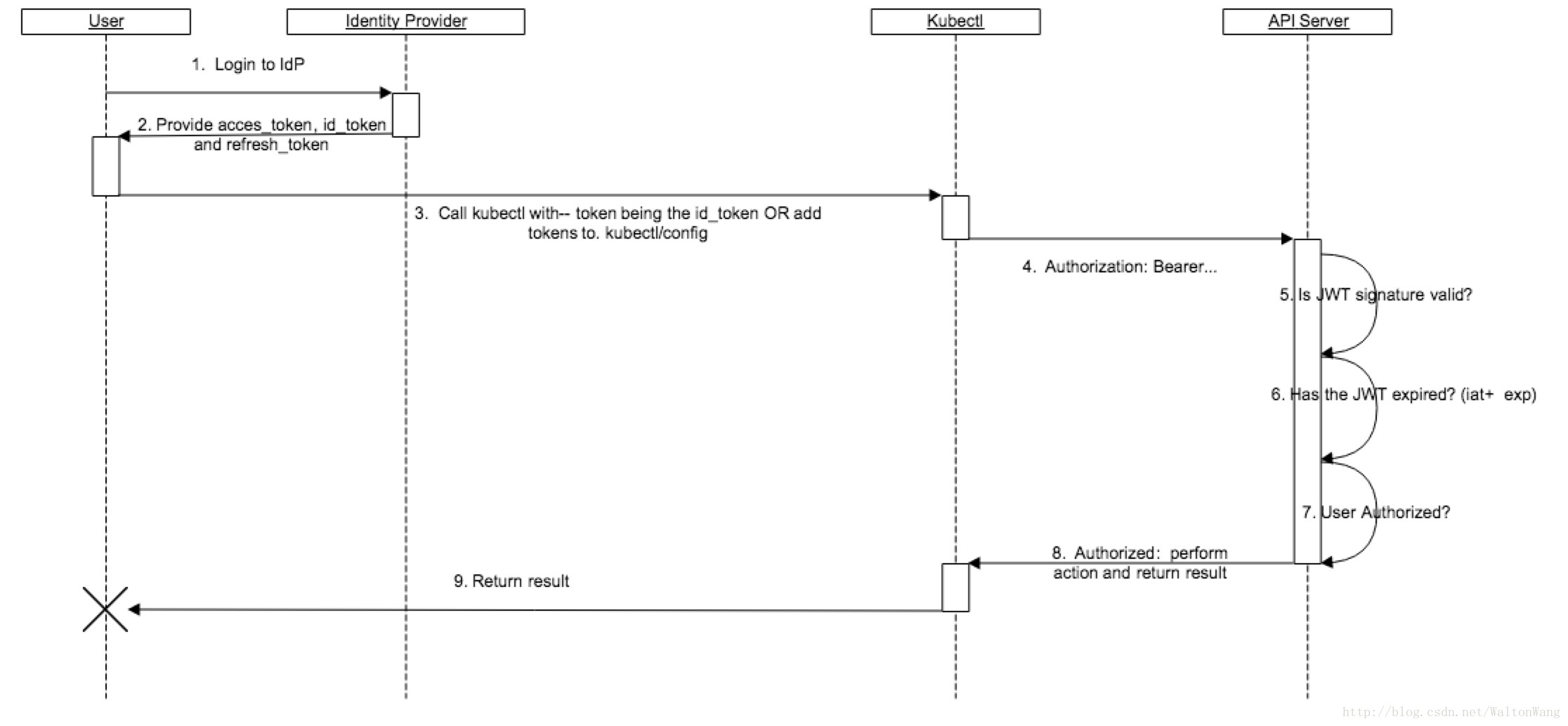
Authentication modules include Client Certificates, Password, and Plain Tokens, Bootstrap Tokens, and JWT Tokens (used for service accounts).
-
Multiple authentication modules can be specified, in which case each one is tried in sequence, until one of them succeeds.
-
The API server does not guarantee the order authenticators run in.
-
The system:authenticated group is included in the list of groups for all authenticated users.
-
authentication plugins attempt to associate the following attributes with the request:
- Username
- UID
- Groups
- Extra fields
-
X509 Client Certs
- Client certificate authentication is enabled by passing the –client-ca-file=SOMEFILE option to API server.
--client-ca-file=/srv/kubernetes/ca.crt--tls-cert-file=/srv/kubernetes/server.crt--tls-private-key-file=/srv/kubernetes/server.key-
the common name of the subject is used as the user name for the request.
For example, using the openssl command line tool to generate a certificate signing request:
openssl req -new -key jbeda.pem -out jbeda-csr.pem -subj “/CN=jbeda/O=app1/O=app2”
This would create a CSR for the username “jbeda”, belonging to two groups, “app1” and “app2”.
use openssl to manually generate certificates for your cluster.
- openssl genrsa -out ca.key 2048
- openssl req -x509 -new -nodes -key ca.key -subj “/CN=${MASTER_IP}” -days 10000 -out ca.crt
- openssl genrsa -out server.key 2048
- openssl req -new -key server.key -subj “/CN=${MASTER_IP}” -out server.csr
- openssl x509 -req -in server.csr -CA ca.crt -CAkey ca.key -CAcreateserial -out server.crt -days 10000
- openssl x509 -noout -text -in ./server.crt
-
Static Token File
- The API server reads bearer tokens from a file when given the
--token-auth-file=SOMEFILEoption on the command line. -
The token file is a csv file with a minimum of 3 columns: token, user name, user uid, followed by optional group names. For example,
token,user,uid,"group1,group2,group3" -
Putting a Bearer Token in a Request: Authorization header with a value of Bearer THETOKEN. For example,
Authorization: Bearer 31ada4fd-adec-460c-809a-9e56ceb75269
- The API server reads bearer tokens from a file when given the
-
Bootstrap Tokens
- This feature is currently in alpha.
--experimental-bootstrap-token-authflag on the API Server.- You must enable the TokenCleaner controller via the
--controllers=*,tokencleanerflag on the Controller Manager.
-
Static Password File
- Basic authentication is enabled by passing the
--basic-auth-file=SOMEFILEoption to API server. - The basic auth file is a csv file with a minimum of 3 columns: password, user name, user id.
- In Kubernetes version 1.6 and later, you can specify an optional fourth column containing comma-separated group names. For example:
password,user,uid,"group1,group2,group3" - When using basic authentication from an http client, the API server expects an Authorization header with a value of
Basic BASE64ENCODED(USER:PASSWORD).
- Basic authentication is enabled by passing the
-
Service Account Tokens
--service-account-key-fileA file containing a PEM encoded key for signing bearer tokens. If unspecified, the API server’s TLS private key will be used.-
--service-account-lookupIf enabled, tokens which are deleted from the API will be revoked. -
Service accounts authenticate with the username
system:serviceaccount:(NAMESPACE):(SERVICEACCOUNT), and are assigned to the groupssystem:serviceaccountsandsystem:serviceaccounts:(NAMESPACE).
-
OpenID Connect Tokens
--oidc-issuer-url--oidc-client-id--oidc-username-claim--oidc-groups-claim--oidc-ca-file
Kubernetes Authorization
- The request is authorized if an existing policy declares that the user has permissions to complete the requested action.
-
Review Your Request Attributes
- user - The user string provided during authentication
- group - The list of group names to which the authenticated user belongs
- “extra” - A map of arbitrary string keys to string values, provided by the authentication layer
- API - Indicates whether the request is for an API resource
- Request path - Path to miscellaneous non-resource endpoints like /api or /healthz (see kubectl).
- API request verb - API verbs get, list, create, update, patch, watch, proxy, redirect, delete, and deletecollection are used for resource requests. To determine the request verb for a resource API endpoint, see Determine the request verb below.
- HTTP request verb - HTTP verbs get, post, put, and delete are used for non-resource requests
- Resource - The ID or name of the resource that is being accessed (for resource requests only) –* For resource requests using get, update, patch, and delete verbs, you must provide the resource name.
- Subresource - The subresource that is being accessed (for resource requests only)
- Namespace - The namespace of the object that is being accessed (for namespaced resource requests only)
- API group - The API group being accessed (for resource requests only). An empty string designates the core API group.
-
Authorization Modules
- ABAC Mode
--authorization-mode=ABAC --authorization-policy-file=SOME_FILENAME - RBAC Mode
--authorization-mode=RBAC - Webhook Mode
--authorization-mode=Webhook --authorization-webhook-config-file=SOME_FILENAME - AlwaysDeny
--authorization-mode=AlwaysDeny - AlwaysAllow
--authorization-mode=AlwaysAllow - Custom Modules
- ABAC Mode
Using Admission Controllers
- If any of the plug-ins in the sequence reject the request, the entire request is rejected immediately and an error is returned to the end-user.
- All Admission Controllers:
- AlwaysAdmit
- AlwaysPullImages
- AlwaysDeny
- DenyEscalatingExec
- ImagePolicyWebhook
- ServiceAccount
- SecurityContextDeny
- ResourceQuota
- LimitRanger
- InitialResources (experimental)
- NamespaceLifecycle
- DefaultStorageClass
- DefaultTolerationSeconds
- PodSecurityPolicy
- For Kubernetes >= 1.6.0, we strongly recommend running the following set of admission control plug-ins (order matters):
--admission-control=NamespaceLifecycle,LimitRanger,ServiceAccount,PersistentVolumeLabel,DefaultStorageClass,ResourceQuota,DefaultTolerationSeconds

CSDN联合极客时间,共同打造面向开发者的精品内容学习社区,助力成长!
更多推荐



 0
0 0
0- 0


 已为社区贡献6条内容

所有评论(0)