【MyBatis学习】:通过自动回复机器人学习MyBatis(一)
自动回复机器人案例分析基本功能: 接收发送指令; 根据指令自动回复对应的内容; 项目使用技术: JSP+Servlet+JDBC 项目使用数据库中的数据表message 项目目录: 案例代码: web.xml
自动回复机器人案例分析基本功能:
接收发送指令;
根据指令自动回复对应的内容;
项目使用技术:
JSP+Servlet+JDBC
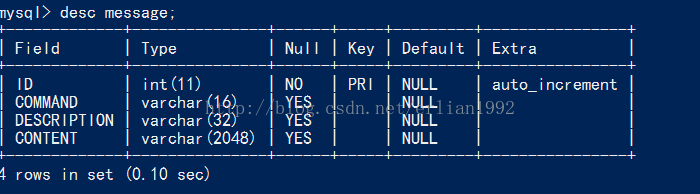
项目使用数据库中的数据表message
项目目录:
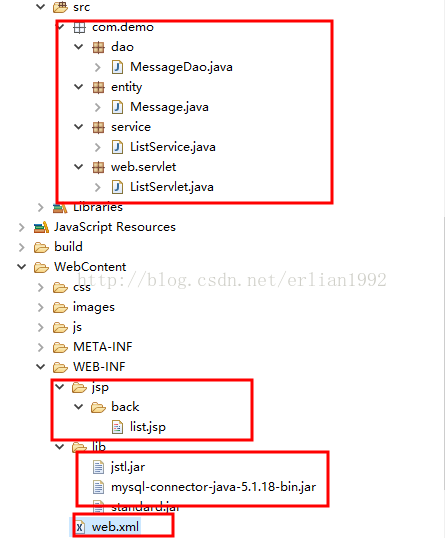
案例代码:
web.xml配置代码:
<?xml version="1.0" encoding="UTF-8"?>
<web-app xmlns:xsi="http://www.w3.org/2001/XMLSchema-instance" xmlns="http://xmlns.jcp.org/xml/ns/javaee" xsi:schemaLocation="http://xmlns.jcp.org/xml/ns/javaee http://xmlns.jcp.org/xml/ns/javaee/web-app_3_1.xsd" id="WebApp_ID" version="3.1">
  <display-name>mybatis_01</display-name>

  <servlet>
      <servlet-name>ListServlet</servlet-name>
      <servlet-class>com.demo.web.servlet.ListServlet</servlet-class>
  </servlet>

  <servlet-mapping>
      <servlet-name>ListServlet</servlet-name>
      <url-pattern>/List.action</url-pattern>
  </servlet-mapping>

</web-app>
list.jap代码:
<%@ page language="java" contentType="text/html; charset=UTF-8"
    pageEncoding="UTF-8"%>
<%@ taglib prefix="c" uri="http://java.sun.com/jsp/jstl/core" %>

<!DOCTYPE html PUBLIC "-//W3C//DTD HTML 4.01 Transitional//EN" "http://www.w3.org/TR/html4/loose.dtd">
<html>
<head>
<meta http-equiv="Content-Type" content="text/html; charset=UTF-8" />
<meta http-equiv="X-UA-Compatible"content="IE=9; IE=8; IE=7; IE=EDGE" />
<title>内容列表页面</title>
<link href="css/all.css" rel="stylesheet" type="text/css" />
</head>
<body style="background: #e1e9eb;">
		<form action="List.action" id="mainForm" method="post">
			<div class="right">
				<div class="current">当前位置:<a href="javascript:void(0)" style="color:#6E6E6E;">内容管理</a> > 内容列表</div>
				<div class="rightCont">
					<p class="g_title fix">内容列表 <a class="btn03" href="#">新 增</a>    <a class="btn03" href="#">删 除</a></p>
					<table class="tab1">
						<tbody>
							<tr>
								<td width="90" align="right">指令名称:</td>
								<td>
									<input name="command" type="text" class="allInput" value="${command }"/>
								</td>
								<td width="90" align="right">描述:</td>
								<td>
									<input name="description" type="text" class="allInput" value="${description }"/>
								</td>
	                            <td width="85" align="right"><input type="submit" class="tabSub" value="查 询" /></td>
	       					</tr>
						</tbody>
					</table>
					<div class="zixun fix">
						<table class="tab2" width="100%">
							<tbody>
								<tr>
								    <th><input type="checkbox" id="all" onclick="#"/></th>
								    <th>序号</th>
								    <th>指令名称</th>
								    <th>描述</th>
								    <th>操作</th>
								</tr>
								<c:forEach items="${messageList }" var="message" varStatus="status">
									<tr <c:if test="${status.index % 2 != 0 }">style="background-color:#ECF6EE;"</c:if>>
										<td><input type="checkbox" /></td>
										<td>${status.index + 1 }</td>
										<td>${message.command }</td>
										<td>${message.description }</td>
										<td>
											<a href="#">修改</a>
											<a href="#">删除</a>
										</td>
									</tr>
								</c:forEach>
							</tbody>
						</table>
						<div class='page fix'>
							共 <b>4</b> 条
							<a href='###' class='first'>首页</a>
							<a href='###' class='pre'>上一页</a>
							当前第<span>1/1</span>页
							<a href='###' class='next'>下一页</a>
							<a href='###' class='last'>末页</a>
							跳至 <input type='text' value='1' class='allInput w28' /> 页
							<a href='###' class='go'>GO</a>
						</div>
					</div>
				</div>
			</div>
	    </form>
	</body>
</html>
ListServlet.java源代码:
package com.demo.web.servlet;

import java.io.IOException;

import javax.servlet.ServletException;
import javax.servlet.http.HttpServlet;
import javax.servlet.http.HttpServletRequest;
import javax.servlet.http.HttpServletResponse;

import com.demo.service.ListService;

/**
 * 列表页面初始化控制
 * @author Administrator
 * @date 2016年12月20日
 */
@SuppressWarnings("serial")
public class ListServlet extends HttpServlet {

	@Override
	protected void doGet(HttpServletRequest req, HttpServletResponse resp) throws ServletException, IOException {
		//设置编码
		req.setCharacterEncoding("UTF-8");

		//从页面获取值
		String command = req.getParameter("command");
		String description = req.getParameter("description");
		//向页面传值
		req.setAttribute("command", command);
		req.setAttribute("description", description);

		//调用业务逻辑层
		ListService listService = new ListService();
        //向页面传值
		req.setAttribute("messageList", listService.queryMessageList(command, description));

		//跳转
		req.getRequestDispatcher("/WEB-INF/jsp/back/list.jsp").forward(req, resp);

	}

	@Override
	protected void doPost(HttpServletRequest req, HttpServletResponse resp) throws ServletException, IOException {
		doGet(req, resp);
	}

}
ListService.java源代码:
package com.demo.service;

import java.util.List;

import com.demo.dao.MessageDao;
import com.demo.entity.Message;

/**
 * 业务逻辑层
 * @author Administrator
 * @date 2016年12月20日
 */
public class ListService {

	public List<Message> queryMessageList(String command, String description){
		MessageDao messageDao = new MessageDao();
		return messageDao.queryMessageList(command, description);
	}

}
Message.java源代码:
package com.demo.entity;

/**
 * 实体类Message
 * @author Administrator
 * @date 2016年12月20日
 */
public class Message {
	private String id;
	private String command;
	private String description;
	private String content;

	public String getId() {
		return id;
	}

	public void setId(String id) {
		this.id = id;
	}

	public String getCommand() {
		return command;
	}

	public void setCommand(String command) {
		this.command = command;
	}

	public String getDescription() {
		return description;
	}

	public void setDescription(String description) {
		this.description = description;
	}

	public String getContent() {
		return content;
	}

	public void setContent(String content) {
		this.content = content;
	}

}
ListDao.java源代码:
package com.demo.dao;

import java.sql.Connection;
import java.sql.DriverManager;
import java.sql.PreparedStatement;
import java.sql.ResultSet;
import java.sql.SQLException;
import java.util.ArrayList;
import java.util.List;

import com.demo.entity.Message;

/**
 * 持久层
 * @author Administrator
 * @date 2016年12月20日
 */
public class MessageDao {
	public List<Message> queryMessageList(String command, String description){
		//数据库连接
		Connection connection = null;
		//预编译的statement,可以提高数据库的性能
        PreparedStatement statement = null;
        //结果集
        ResultSet rs = null;
		List<Message> messageList = new ArrayList<Message>();

		try {
			//1、注册驱动
			Class.forName("com.mysql.jdbc.Driver");

			//2、通过驱动管理类获取数据库的连接
			connection = DriverManager.getConnection("jdbc:mysql://localhost:3306/imooc","root","root");

			//3、建立sql语句
			StringBuilder sql = new StringBuilder("select ID,COMMAND,DESCRIPTION,CONTENT from MESSAGE where 1 = 1");

			List<String> paramList = new ArrayList<String>();

			if (command != null && !"".equals(command.trim())) {
				sql.append(" and COMMAND = ?");
				paramList.add(command);
			}

			if (description != null && !"".equals(description.trim())) {
				sql.append(" and DESCRIPTION like '%' ? '%'");
				paramList.add(description);
			}

			//向数据库发起要求,获取预处理的statement
			statement = connection.prepareStatement(sql.toString());

			//设置参数
			for (int i = 0; i < paramList.size(); i++) {
				statement.setString(i + 1, paramList.get(i));
			}

			//4、向数据库发出SQL语句查询,获取结果集
			rs = statement.executeQuery();

			//5、处理结果集
			while (rs.next()) {
				Message message = new Message();
				messageList.add(message);
				message.setId(rs.getString("ID"));
				message.setCommand(rs.getString("COMMAND"));
				message.setDescription(rs.getString("DESCRIPTION"));
				message.setContent(rs.getString("CONTENT"));
			}
		} catch (ClassNotFoundException e) {
			e.printStackTrace();
		} catch (SQLException e) {
			e.printStackTrace();
		} finally{
            //6、释放资源
            if(rs !=null){
                try {
					rs.close();
				} catch (SQLException e) {
					e.printStackTrace();
				}
            }
            if(statement != null){
                try {
                    statement.close();
                } catch (SQLException e) {
                    e.printStackTrace();
                }
            }
            if(connection != null){
                try {
                    connection.close();
                } catch (SQLException e) {
                    e.printStackTrace();
                }
            }
		}
		//返回List结果集
		return messageList;
	}

}
演示效果:
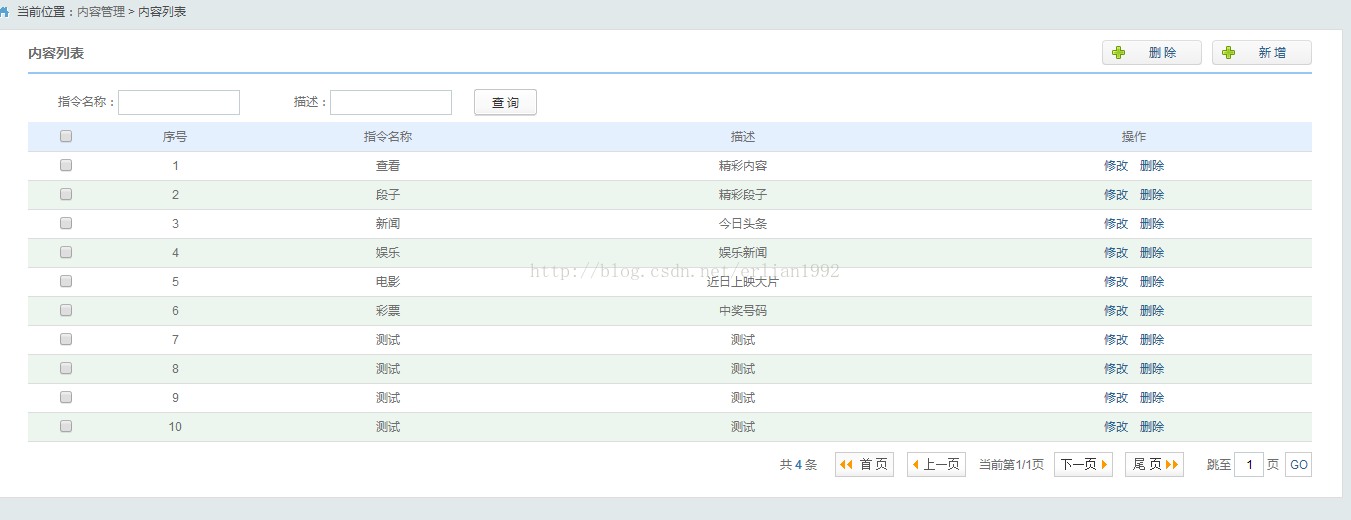
打开显示列表页
进行两个条件的模糊查询:
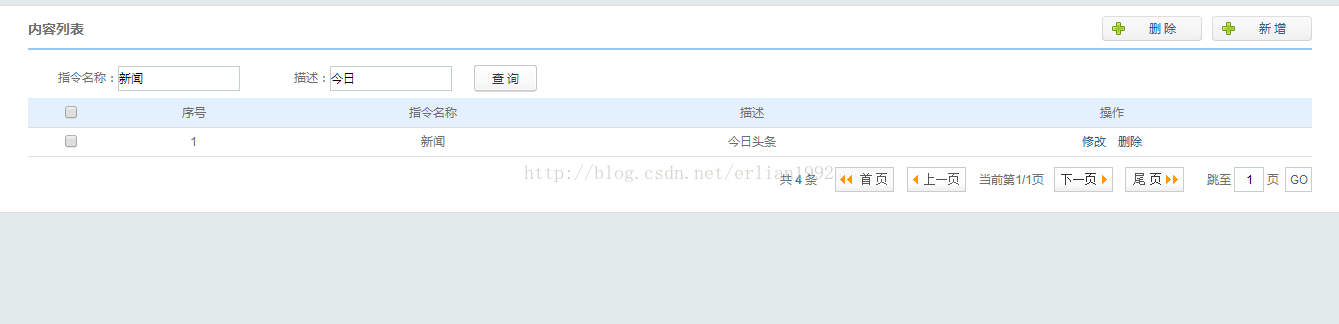
进行一个条件的模糊查询
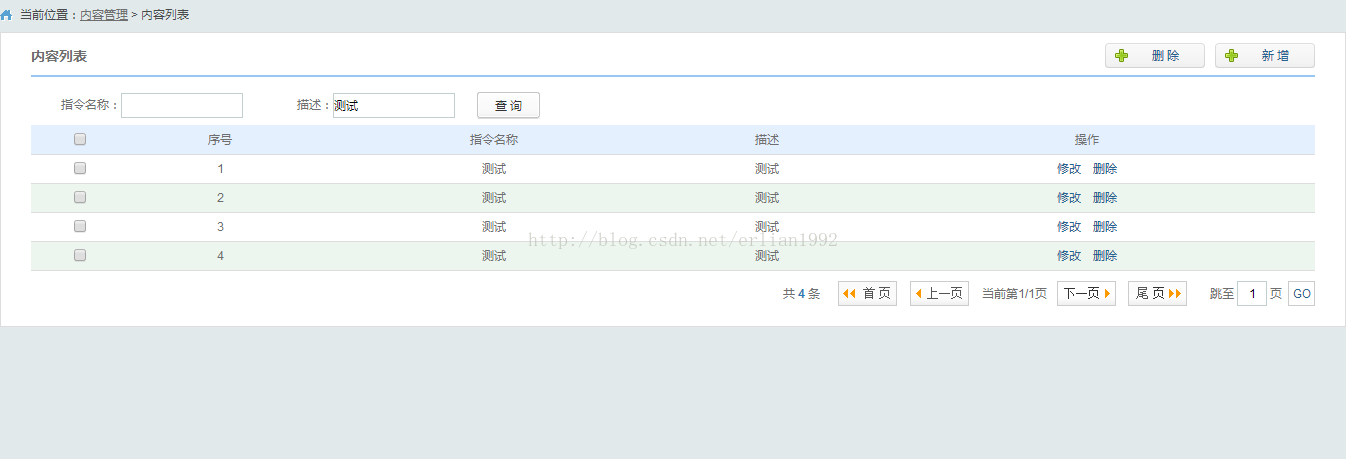
这只是完成了一个模糊查询的功能,最重要的就是持久层(dao层)的原始的JDBC代码,这是持久层框架需要
解决的一层,不管是Hibernate还是MyBatis,都需要对原始JDBC代码进行封装,以便获得更简洁高效的代码。
对原生态JDBC程序(单独使用JDBC)中问题总结
1)数据库连接,使用时就创建,不使用立即释放,对数据库进行频繁的连接开启和关闭,造成数据库资源浪费,
影响数据库性能。
解决方案:使用数据库连接池来管理数据库连接。
2)将SQL语句硬编码到Java代码中,如果SQL语句修改,需要重新编译Java代码,不利于系统维护。
解决方案:将SQL语句配置在XML配置文件中,即使SQL变化,不需要对Java代码进行重新编译。
3)向prepareStatement中设置参数,对占位符位置和设置参数值,硬编码在Java代码中,不利于系统维护。
解决方案:将SQL语句及占位符和参数全部配置到XML中。
4)从resultSet中遍历结果集数据时,存在硬编码,将获取表的字段进行硬编码,不利于系统维护。
解决方案:将查询的结果集,自动映射成Java对象。

CSDN联合极客时间,共同打造面向开发者的精品内容学习社区,助力成长!
更多推荐



 2
2 0
0- 0


 已为社区贡献1条内容

所有评论(0)