python flask使用蓝图渲染模板直接显示html代码问题
问题描述:跟着文档示例想简单显示一个html页面的,结果渲染出来的是html源码。。。看着输出的内容想着应该是没有识别出是html代码的原因,对比html页面的response发现果然不一样,然后开始改response的Content-type# habit.py内容# -*- coding: utf-8 -*-# !/usr/bin/env pythonfrom flask import Blu
问题描述:
跟着文档示例想简单显示一个html页面的,结果渲染出来的是html源码。。。
看着输出的内容想着应该是没有识别出是html代码的原因,对比html页面的response发现果然不一样,然后开始改response的Content-type
# habit.py内容
# -*- coding: utf-8 -*-
# !/usr/bin/env python

from flask import Blueprint, render_template
habit = Blueprint('habit',__name__)


@habit.route('/')
def index():
    api_list = {}
    return api_list


@habit.route('/get/')
def get(name=None):
    return render_template('cs.html', name=name)


# cs.html内容

<!doctype html>
<title>Hello from Flask</title>
<h1>{{ name }}:</h1>
<h1>Hello, World!</h1>
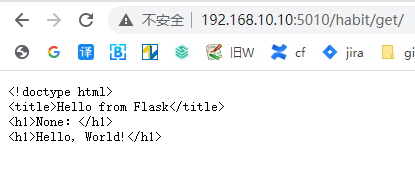
请求api直接显示html源码
response信息
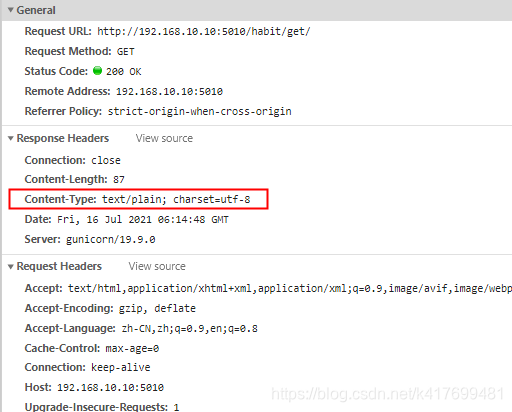
原因分析:
浏览器没有识别到html代码
解决方案:
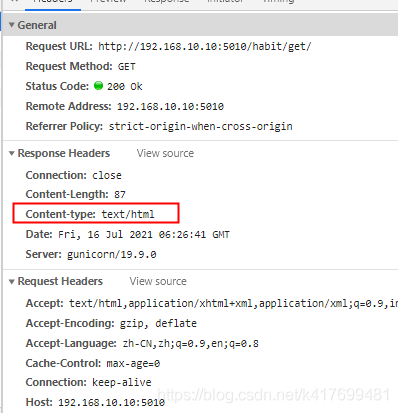
改response的Content-type
out_html = render_template(‘cs.html’, name=name)
-
return 多个值
return out_html , "200 Ok", {"Content-type": "text/html"}
return后面的值说明:index.html 表示字符串,也就是网站页面显示的内容
‘200 ok’ 表示状态码和对状态码的解析
{“Content-type”:“text/html”} 表示请求头
请求头不是必须要的,但是前面两个必须要,前提你是retrun多个值,还有就是顺序不能改变。 -
return make_response
return out_html , 200, {"Content-type": "text/html"})
make_response 它可以传递三个参数 第一个还是一个字符串,第二个传状态码,第三个传请求头, -
return Response对象
response = Response()
response.data= out_html
response.headers = {“Content-type”: “text/html”}
return response
三种方法都试过,都是可以的
这里贴一下最简单的 return 多个值 的结果
# habit.py内容
# -*- coding: utf-8 -*-
# !/usr/bin/env python

from flask import Blueprint, render_template
habit = Blueprint('habit',__name__)


@habit.route('/')
def index():
    api_list = {}
    return api_list


@habit.route('/get/')
def get(name=None):
    out_html = render_template('cs.html', name=name)
    return out_html , "200 Ok", {"Content-type": "text/html"}
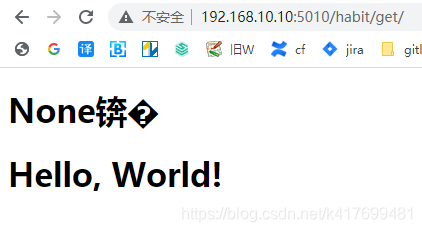
请求api直接显示html源码
response信息

CSDN联合极客时间,共同打造面向开发者的精品内容学习社区,助力成长!
更多推荐



 1
1 0
0- 0


 已为社区贡献1条内容

所有评论(0)