antd 4.5 动态侧边栏图标实现
antd 4.5 动态侧边栏图标实现1 .js文件中 配置菜单项信息2.jsx文件中map+递归3 renderreturn中添加以下语句如何构建静态侧边栏(写死)https://ant.design/components/menu-cn/#API1 .js文件中 配置菜单项信息引入 React添加 icons<____/>想要的icons组件名menuList为菜单项的数组impor
·
antd 4.5 动态侧边栏图标实现
如何构建静态侧边栏(写死)

https://ant.design/components/menu-cn/#API
1 .js文件中 配置菜单项信息
- 引入 React
- 添加 icons
- < ____ /> 想要的icons组件名
menuList为菜单项的数组
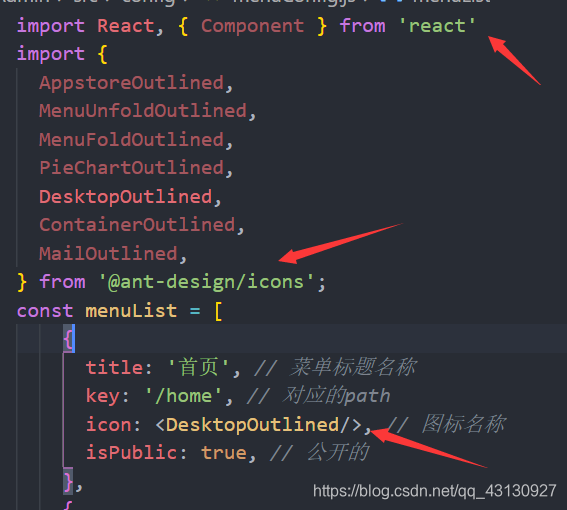
import React, { Component } from 'react'
import {
  AppstoreOutlined,
  MenuUnfoldOutlined,
  MenuFoldOutlined,
  PieChartOutlined,
  DesktopOutlined,
  ContainerOutlined,
  MailOutlined,
} from '@ant-design/icons';
const menuList = [
    {
      title: '首页', // 菜单标题名称
      key: '/home', // 对应的path
      icon: <DesktopOutlined/>, // 图标名称
      isPublic: true, // 公开的
    },
    {
      title: '商品',
      key: '/products',
      icon: 'appstore',
      children: [ // 子菜单列表
        {
          title: '品类管理',
          key: '/category',
          icon: ''
        },
        {
          title: '商品管理',
          key: '/product',
          icon: ''
        },
      ]
    },

    {
      title: '用户管理',
      key: '/user',
      icon: ''
    },
    {
      title: '角色管理',
      key: '/role',
      icon: ''
    },

    {
      title: '图形图表',
      key: '/charts',
      icon: 'area-chart',
      children: [
        {
          title: '柱形图',
          key: '/charts/bar',
          icon: ''
        },
        {
          title: '折线图',
          key: '/charts/line',
          icon: ''
        },
        {
          title: '饼图',
          key: '/charts/pie',
          icon: ''
        },
      ]
    },
  ]

  export default menuList
2 .jsx文件中 map+递归
getMenuNodes_map = (menuList)=>{
        return menuList.map(item=>{
            if(!item.children){
                return(<Menu.Item key={item.key} icon={item.icon} >
                    <Link to={item.key}>
                     <span>{item.title}</span>
                    </Link>
                </Menu.Item>)
            }else{
                return(<SubMenu key={item.key} title={item.title} icon={item.icon}>
                    {this.getMenuNodes(item.children)}
                </SubMenu>)
            }
        })
    }
3 render return中添加以下语句
 <Menu>
	{this.getMenuNodes(menuList)}
 <Menu/

CSDN联合极客时间,共同打造面向开发者的精品内容学习社区,助力成长!
更多推荐



 2
2 0
0- 0


 已为社区贡献1条内容

所有评论(0)