通过百度语音识别打开网址或百度搜索
参考链接:https://blog.csdn.net/exmlyshy/article/details/84760845参考链接中的118行if type(result) == str:这句有问题,无法实现打开网页的任务。且开头没有加入强制编码三句:import sysreload(sys)sys.setdefaultencoding(‘utf-8’)导致我吃了不少苦,用python2...
参考链接:https://blog.csdn.net/exmlyshy/article/details/84760845
本文所有代码链接:https://pan.baidu.com/s/1LT5LBkOOGrzMyg6GADf-Og
参考链接中的118行if type(result) == str:这句有问题,无法实现打开网页的任务。且开头没有加入强制编码三句:
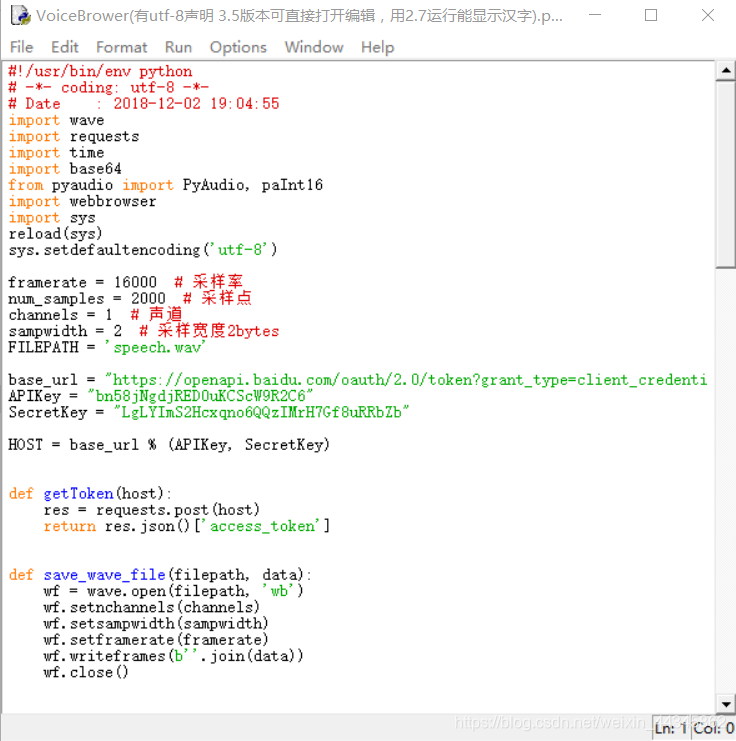
import sys
reload(sys)
sys.setdefaultencoding(‘utf-8’)
导致我吃了不少苦,用python2.7运行会出现各种错误,所得到结果需要编码转换,虽然实现了,可是感觉不舒服,因没法显示汉字啊,加了上面三句可以的,我树莓派是装过汉字系统的。
用python3.5打开时如上图,如果点了OK,那就麻烦了,文件就废掉了!所以如果编辑,要用记事本打开。
一. 没有加以上三句编码 完成的任务代码如下(无法显示汉字,请用记事本打开编辑):
#!/usr/bin/env python
import wave
import requests
import time
import base64
from pyaudio import PyAudio, paInt16
import webbrowser
import signal
framerate = 16000 # 采样率
num_samples = 2000 # 采样点
channels = 1 # 声道
sampwidth = 2 # 采样宽度2bytes
FILEPATH = ‘speech.wav’
base_url = “https://openapi.baidu.com/oauth/2.0/token?grant_type=client_credentials&client_id=%s&client_secret=%s”
APIKey = “bn58jNgdjRED0uKCScW9R2C6”
SecretKey = “LgLYImS2Hcxqno6QQzIMrH7Gf8uRRbZb”
HOST = base_url % (APIKey, SecretKey)
def getToken(host):
res = requests.post(host)
return res.json()[‘access_token’]
def save_wave_file(filepath, data):
wf = wave.open(filepath, ‘wb’)
wf.setnchannels(channels)
wf.setsampwidth(sampwidth)
wf.setframerate(framerate)
wf.writeframes(b’’.join(data))
wf.close()
def my_record():
pa = PyAudio()
stream = pa.open(format=paInt16, channels=channels,
rate=framerate, input=True, frames_per_buffer=num_samples)
my_buf = []
# count = 0
t = time.time()
print(‘record…’)
while time.time() < t + 4:  # second
    string_audio_data = stream.read(num_samples)
    my_buf.append(string_audio_data)
print('record over.')
save_wave_file(FILEPATH, my_buf)
stream.close()
def get_audio(file):
with open(file, ‘rb’) as f:
data = f.read()
return data
def speech2text(speech_data, token, dev_pid=1537):
FORMAT = ‘wav’
RATE = ‘16000’
CHANNEL = 1
CUID = ‘*******’
SPEECH = base64.b64encode(speech_data).decode(‘utf-8’)
data = {
    'format': FORMAT,
    'rate': RATE,
    'channel': CHANNEL,
    'cuid': CUID,
    'len': len(speech_data),
    'speech': SPEECH,
    'token': token,
    'dev_pid':dev_pid
}
url = 'https://vop.baidu.com/server_api'
headers = {'Content-Type': 'application/json'}
# r=requests.post(url,data=json.dumps(data),headers=headers)
print('recognizing...')
r = requests.post(url, json=data, headers=headers)
Result = r.json()
if 'result' in Result:
    return Result['result'][0]
else:
    print 'get nothing!'
def sigint_handler(signum, frame):
stream.stop_stream()
stream.close()
p.terminate()
print ‘catched interrupt signal!’
sys.exit(0)
if name == ‘main’:
flag = ‘y’
# 注册ctrl-c中断
signal.signal(signal.SIGINT, sigint_handler)
while flag.lower() == ‘y’:
my_record()
TOKEN = getToken(HOST)
speech = get_audio(FILEPATH)
words = speech2text(speech, TOKEN)#默认1537
print(words)
result = words.encode(‘gbk’) # gbk编码,此编码也可用于指定网页的打开,但对于百度自动搜索会出乱码
    if ('腾讯') in result:
        webbrowser.open_new_tab('https://www.qq.com')
    elif ('网易') in result:
         webbrowser.open_new_tab('https://www.163.com')
    else:
        result = words.encode('utf-8')  # utf-8编码,这样就不乱了
        result.strip('。')#这句竟然无法消除最后的。号,不影响结果,将来再改进吧。
        webbrowser.open_new_tab('https://www.baidu.com/s?wd=%s' % result)
    flag = raw_input('Continue?(y/n):\n')#python3用input()
二. 加了强制编码三句,完成任务的如下(显示汉字):
#!/usr/bin/env python
import wave
import requests
import time
import base64
from pyaudio import PyAudio, paInt16
import webbrowser
import sys
reload(sys)
sys.setdefaultencoding(‘utf-8’)
framerate = 16000 # 采样率
num_samples = 2000 # 采样点
channels = 1 # 声道
sampwidth = 2 # 采样宽度2bytes
FILEPATH = ‘speech.wav’
base_url = “https://openapi.baidu.com/oauth/2.0/token?grant_type=client_credentials&client_id=%s&client_secret=%s”
APIKey = “bn58jNgdjRED0uKCScW9R2C6”
SecretKey = “LgLYImS2Hcxqno6QQzIMrH7Gf8uRRbZb”
HOST = base_url % (APIKey, SecretKey)
def getToken(host):
res = requests.post(host)
return res.json()[‘access_token’]
def save_wave_file(filepath, data):
wf = wave.open(filepath, ‘wb’)
wf.setnchannels(channels)
wf.setsampwidth(sampwidth)
wf.setframerate(framerate)
wf.writeframes(b’’.join(data))
wf.close()
def my_record():
pa = PyAudio()
stream = pa.open(format=paInt16, channels=channels,
rate=framerate, input=True, frames_per_buffer=num_samples)
my_buf = []
# count = 0
t = time.time()
print(‘正在录音…’)
while time.time() < t + 4:  # 秒
    string_audio_data = stream.read(num_samples)
    my_buf.append(string_audio_data)
print('录音结束.')
save_wave_file(FILEPATH, my_buf)
stream.close()
def get_audio(file):
with open(file, ‘rb’) as f:
data = f.read()
return data
def speech2text(speech_data, token, dev_pid=1537):
FORMAT = ‘wav’
RATE = ‘16000’
CHANNEL = 1
CUID = ‘*******’
SPEECH = base64.b64encode(speech_data).decode(‘utf-8’)
data = {
    'format': FORMAT,
    'rate': RATE,
    'channel': CHANNEL,
    'cuid': CUID,
    'len': len(speech_data),
    'speech': SPEECH,
    'token': token,
    'dev_pid':dev_pid
}
url = 'https://vop.baidu.com/server_api'
headers = {'Content-Type': 'application/json'}
# r=requests.post(url,data=json.dumps(data),headers=headers)
print('正在识别...')
r = requests.post(url, json=data, headers=headers)
Result = r.json()
if 'result' in Result:
    return Result['result'][0]
else:
    return Result
if name == ‘main’:
flag = ‘y’
while flag.lower() == ‘y’:
print(‘请输入数字选择语言:’)
my_record()
TOKEN = getToken(HOST)
speech = get_audio(FILEPATH)
result = speech2text(speech, TOKEN)
print(result)
if (‘腾讯’) in result:
webbrowser.open_new_tab(‘https://www.qq.com’)
elif (‘网易’) in result:
webbrowser.open_new_tab(‘https://www.163.com’)
else:
webbrowser.open_new_tab(‘https://www.baidu.com/s?wd=%s’ % result)
flag = raw_input(‘Continue?(y/n):’)

CSDN联合极客时间,共同打造面向开发者的精品内容学习社区,助力成长!
更多推荐



 0
0 0
0- 0


 已为社区贡献5条内容

所有评论(0)