hadoop之使用python进行streaming编程
·
目的:统计文件中单词出现的词频
准备:创建测试数据test.txt并写入如下内容
foo    bar    quux
foo    libs    bar
zoo    zoo    hying
1、创建mapper分割数据并写入标准输出流
$vi mapper.py

#!/usr/bin/python
import sys

for line in sys.stdin:  # 遍历读入数据的每一行

    line = line.strip()  # 将行尾行首的空格去除
    words = line.split()  #按空格将句子分割成单个单词
    for word in words:
        print('%s\t%s' %(word, 1))
2、输出流作为输入数据,创建reduce 对输出结果计算
$vi reducer.py

#!/usr/bin/python
from operator import itemgetter
import sys

current_word = None  # 为当前单词
current_count = 0  # 当前单词频数
word = None

for line in sys.stdin:
    words = line.strip()  # 去除字符串首尾的空白字符
    word, count = words.split('\t')  # 按照制表符分隔单词和数量

    try:
        count = int(count)  # 将字符串类型的‘1’转换为整型1
    except ValueError:
        continue

    if current_word == word:  # 如果当前的单词等于读入的单词
        current_count += count  # 单词频数加1
    else:
        if current_word:  # 如果当前的单词不为空则打印其单词和频数
            print('%s\t%s' %(current_word, current_count))
        current_count = count  # 否则将读入的单词赋值给当前单词,且更新频数
        current_word = word

if current_word == word:
    print ('%s\t%s' %(current_word, current_count))
3、本地测试执行
$cat test.txt | ./mapper.py | sort -k 1,1 | ./reducer.py
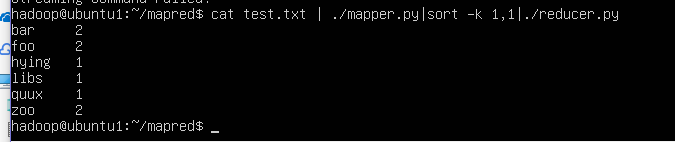
4、上传测试文件到hadoop文件系统
$hdfs dfs -mkdir /input
$hdfs dfs -put ./test.txt /input
5、调用streaming接口运行
$hadoop jar {$HADOOP_HOME}/share/hadoop/tools/lib/hadoop-streaming-3.2.1.jar -files ./mapper.py,./reducer.py -mapper ./mapper.py -reducer ./reducer.py -input /input/test.txt -output /output
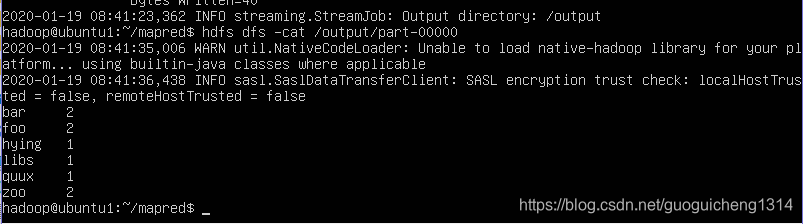
6、查看执行结果
$hdfs dfs -cat /output/part-00000

CSDN联合极客时间,共同打造面向开发者的精品内容学习社区,助力成长!
更多推荐


 0
0 0
0- 0


 已为社区贡献1条内容

所有评论(0)