10-常见API&异常
1.常见API1.1MathMath概述Math包含执行基本数字运算的方法Math中方法的调用方式Math类中无构造方法,但内部的方法都是静态的,则可以通过 类名**.**进行调用Math类的常用方法方法名说明public static int abs(int a)返回参数的绝对值public static double ceil(double a)返回大于或等于参数的最小double值,等于一个
1.常见API
1.1Math
-
Math概述
Math包含执行基本数字运算的方法
-
Math中方法的调用方式
Math类中无构造方法,但内部的方法都是静态的,则可以通过 类名**.**进行调用
-
Math类的常用方法
方法名 说明 public static int abs(int a) 返回参数的绝对值 public static double ceil(double a) 返回大于或等于参数的最小double值,等于一个整 数 public static double floor(double a) 返回小于或等于参数的最大double值,等于一个整 数 public static int round(float a) 按照四舍五入返回最接近参数的int public static int max(int a,int b) 返回两个int值中的较大值 public static int min(int a,int b) 返回两个int值中的较小值 public static double pow (double a,double b) 返回a的b次幂的值 public static double random() 返回值为double的正值,[0.0,1.0)
1.2System
- System类的常用方法
| 方法名 | 说明 |
|---|---|
| public static void exit(int status) | 终止当前运行的 Java 虚拟机,非零表示异常终止 |
| public static long currentTimeMillis() | 返回当前时间(以毫秒为单位) |
| public static void arraycopy(<Object src, int srcPos, Object dest, int destPos, intlength) | 复制数组 |
- 示例代码
public class Demo01 {
    public static void main(String[] args) {
        long start = System.currentTimeMillis();
        for (int i = 1; i < 10000; i++) {
            System.out.println(i);
        }
        long end = System.currentTimeMillis();
        System.out.println("一共花了:" +(end - start) + "毫秒");

        //static void arraycopy(Object src, int srcPos, Object dest, int destPos, int length)
        // 将指定源数组中的数组从指定位置复制到目标数组的指定位置。
        int[] arr1 = {1,2,3,4,5};
        int[] arr2 =new int[10];
        System.arraycopy(arr1,0,arr2,0,arr1.length);
        for (int i = 0; i < arr2.length; i++) {
            System.out.println(arr2[i]);
        }
        System.out.println("---------");
        //把第一个数组的最后俩个数据,copy到arr2的最后的俩个位置
        System.arraycopy(arr1,3,arr2,8,2);
        for (int i = 0; i < arr2.length; i++) {
            System.out.println(arr2[i]);
        }
    }
}
1.3Object类的toString方法
- Object类概述
- Object 是类层次结构的根,每个类都可以将 Object 作为超类。所有类都直接或者间接的继承自该类,换句话说,该类所具备的方法,所有类都会有一份
- 查看方法源码的方式
- 选中方法,按下Ctrl + B
- 重写toString方法的方式
- Alt + Insert 选择toString
- 在类的空白区域,右键 -> Generate -> 选择toString
- toString方法的作用:
- 以良好的格式,更方便的展示对象中的属性值
1.4Object类的equals方法
- equals方法的作用
- 用于对象之间的比较,返回true和false的结果
- 举例:s1.equals(s2); s1和s2是两个对象
- 重写equals方法的场景
- 不希望比较对象的地址值,想要结合对象属性进行比较的时候
- 子类没有重写equals方法:比较的是地址值,等价于“==”
- 子类重写了equals方法:比较的是属性值
- 注意:在API中有一些类,本身就复写了toString和equals方法
1.5Objects类
Objects类是JDK7之后才有的工具类,可以用来判断对象是否为null等操作
1.static boolean nonNull(Object obj)
	返回 true如果提供的参考是非 null否则返回 false

2.static boolean isNull(Object obj)
	返回 true如果提供的引用是 null否则返回 false

3.static String toString(Object o)
	返回非 null参数调用 toString的结果和 null参数的 "null"的 null

4.static String toString(Object o, String nullDefault)
	如果第一个参数不是 null ,则返回第一个参数上调用 toString的结果,否则返回第二个参数。
1.6冒泡排序原理
- 冒泡排序概述
- 一种排序的方式,对要进行排序的数据中相邻的数据进行两两比较,将较大的数据放在后面,依次对所有的数据进行操作,直至所有数据按要求完成排序
- 如果有n个数据进行排序,总共需要比较n-1次
- 每一次比较完毕,下一次的比较就会少一个数据参与
- 代码实现
public class test03 {
    public static void main(String[] args) {
        int[] arr = {11, 22, 34, 21, 23};
        System.out.println("排序前:" + arrayToString(arr));
        bubbleSort(arr);
        System.out.println("排序后:" + arrayToString(arr));
    }
    //冒泡排序
    public static void bubbleSort(int[] arr) {
        if(arr==null || arr.length < 2 ){
            return;
        }
        // 这里减1,是控制每轮比较的次数
        for (int i = 0; i < arr.length - 1; i++) {
            // 1是为了避免索引越界,x是为了调高比较效率
            for (int j = 0; j < arr.length - i -1; j++) {
                if (arr[j] > arr[j + 1]) {
                    int temp = arr[j];
                    arr[j] = arr[j + 1];
                    arr[j + 1] = temp;
                }
            }
        }
    }
    //拼接
    public static String arrayToString(int[] arr) {
        StringBuilder sb = new StringBuilder();
        sb.append("[");
        for (int i = 0; i < arr.length; i++) {
            if (i == arr.length - 1) {
                sb.append(arr[i]);
            } else {
                sb.append(arr[i]).append(",");
            }
        }
        sb.append("]");
        String s = sb.toString();
        return s;
    }
}
1.7二分查找
-
二分查找要求数组的元素必须要是从小到大的顺序,否则做不了二分查找
思路: 1.定义开始索引和结束索引 int start=0; int end=array.length-1; 2.计算中间的索引 int mid=(start+end)/2; 3.让中间元素和目标元素进行比较 如果:array[mid]>key,end=mid-1 如果:array[mid]<key,start=mid+1 如果:array[mid]==key,mid就是最终的结果 如果所有的元素都没有相等,就没有找到,返回-1 -
代码实现
public class ArrayDemo01 {
    public static void main(String[] args) {
        int[] arr = {1, 2, 3, 4, 5, 6, 7, 8, 9, 10};
        int number = 5;
        int i = Arrays.binarySearch(arr, 5);
        System.out.println("Arrays.binarySearch:" + i);
        int index = getIndex(arr, number);
        System.out.println("index:" + index);
    }

    public static int getIndex(int[] arr, int number) {
        int start = 0;
        int end = arr.length - 1;
        while (start < end) {
            int mid = (start + end) / 2;
            if (arr[mid] > number) {
                //表示要找的元素在mid的左边
                end = mid - 1;
            }
            if (arr[mid] < number) {
                //表示要找的元素在mid的右边
                start = mid + 1;
            } else if (arr[mid] == number) {
                return mid;
            }
        }
        return -1;
    }
}
1.8快速排序
- 代码实现
public class ArrayDemo05 {
    public static void main(String[] args) {
        int[] arr = {6, 2, 1, 7, 9, 5, 4, 3, 10, 8};
        quickSort(arr,0,arr.length-1);
        System.out.println(Arrays.toString(arr));
    }

    public static void quickSort(int[] arr, int left, int right) {
        if (left>right){
            return;
        }
        //记录最开始的索引位置
        int left0 = left;
        int right0 = right;
        //确定基准数
        int baseNumber =arr[left0];
        while (left<right) {
            while (arr[right] >=baseNumber && left < right) {
                right--;
            }
            while (arr[left] <= baseNumber && left < right) {
                left++;
            }
            //交换数据
            int temp = arr[left];
            arr[left]=arr[right];
            arr[right]=temp;
        }
        //交换基准数
        arr[left0]=arr[left];
        arr[left] = baseNumber;
        //递归
        quickSort(arr,left0,left-1);
        quickSort(arr,right+1,right0);
    }
}
1.9Arrays
-
Arrays的常用方法
方法名 说明 public static int binarySearch(int[] a, int key) 使用二分查找法对查找数组中的元素;如果没有找到,返回一个负数 public static String toString(int[] a) 返回指定数组的内容的字符串表示形式 public static void sort(int[] a) 按照数字顺序排列指定的数组
2.BigDecimal类
-
BigDecimal可以对数据进行精确的运算,需要用它提供的方法对数据进行运算
-
BigDecimal的常用方法
方法名 说明 public BigDecimal add(BigDecimal augend) 加法运算 public BigDecimal subtract(BigDecimal subtrahend) 减法运算 public BigDecimal multiply(BigDecimal multiplicand) 乘法运算 public BigDecimal divide(BigDecimal divisor) 除法运算 -
public BigDecimal divide(BigDecimal divisor, int scale,int roundingMode) 除法运算,可以保留指定的小数位 参数解释: BigDecimal divisor:参与运算的除数 int scale:保留的位数 int roundingMode: 舍入模式 BigDecimal.ROUND_UP: 进一法 BigDecimal.ROUND_Floor: 去尾法 BigDecimal.ROUND_HALF_UP: 四舍五入 -
注意:
- 演示四则运算:参与要运算的数据,都需要封装尾BigDecimal对象
- 进行精确运算的时候,用字符串的构造
-
用BigDecimal类对数组元素求和
public class Demo03 {
    public static void main(String[] args) {
        int[] arr = {11, 22, 33, 44, 55};
        BigDecimal sum = new BigDecimal("0");
        for (int i = 0; i < arr.length; i++) {
            BigDecimal bd1 = new BigDecimal(arr[i] + "");
            sum = sum.add(bd1);
        }
        System.out.println(sum);
    }
}
2.包装类
2.1基本类型包装类
-
基本类型包装类的作用
将基本数据类型封装成对象的好处在于可以在对象中定义更多的功能方法操作该数据
常用的操作之一:用于基本数据类型与字符串之间的转换 -
基本类型对应的包装类
基本数据类型 包装类 byte Byte short Short int Integer long Long float Float double Double char Character boolean Boolean
2.2Integer类
-
Integer类概述
包装一个对象的原始类型int值
-
Integer类的构造方法
方法名 说明 public Integer(int value) 根据 int 值创建 Integer 对象(过时) public Integer(String s) 根据 String 值创建 Integer 对象(过时) public static Integer valueOf(int i) 返回表示指定的 int 值的 Integer 实例 public static Integer valueOf(String s) 返回一个保存指定值的 Integer 对象 String
2.3int类型和String类型的相互转换
-
int转换String
- 转换方式
- 方式一:直接在数字后面加空字符串
- 方式二:通过String类静态方法valueOf()
- 示例代码
public class IntegerDemo02 { public static void main(String[] args) { //方式一 //int-String int number = 100; String s = number + ""; System.out.println(s); System.out.println("---------"); //方式二 ////public static String valueOf(int i) String s1 = String.valueOf(number); System.out.println(s1); } } - 转换方式
-
String转换为int
- 转换方式
- 方式一:先将字符串数字类型转成Integer,在调用valuseOf()方法
- 方式二:通过Integer静态方法parseInt()进行转换
- 示例代码
public class IntegerDemo03 { public static void main(String[] args) { //方式一 //String --- Integer --- int String s = "100"; Integer integer = Integer.valueOf(s); int i = integer.intValue(); System.out.println(i); System.out.println("---------"); //方式2 //public static int parseInt(String s) int parseInt = integer.parseInt(s); System.out.println(parseInt); } } - 转换方式
2.4字符串数据排序案例
-
需求:有一个字符串:“91 27 46 38 50”,请写程序实现最终输出结果是:“27 38 46 50 91”
-
代码实现
public class IntegerDemo04 {
    public static void main(String[] args) {
        //定义一个字符串
        String s = "91 27 46 38 50";
        //得到字符串中的每一个字符数据
        //public string[] split(String regex)
        String[] strArray = s.split(" ");
        //定义一个int类型的数组,把string类型数组的每一个元素存储到int数组中
        int[] arr = new int[strArray.length];
        for (int i = 0; i < arr.length; i++) {
            arr[i] = Integer.parseInt(strArray[i]);
        }
        //对int数组进行排序
        Arrays.sort(arr);
        //对排序后的数组进行字符串拼接
        StringBuilder sb = new StringBuilder();
        for (int i = 0; i < arr.length; i++) {
            if (i == arr.length - 1) {
                sb.append(arr[i]);
            } else {
                sb.append(arr[i]).append(" ");
            }
        }
        String result = sb.toString();
        System.out.println(result);
    }
}
2.5自动拆箱和自动装箱
-
自动装箱
把基本数据类型转换为对应的包装类类型
-
自动拆箱
把包装类类型转换为对应的基本数据类型
-
示例代码
Integer i = 100; // 自动装箱
i += 200; // i = i + 200; i + 200 自动拆箱;i = i + 200; 是自动装箱
3.时间日期类(JDK7)
3.1Date类
-
Date类
Date代表了一个特定的时间,精确到毫秒
-
Date类的构造方法
方法名 说明 public Date() 分配一个Date对象,并初始化,以便它代表它被分配的时间,精确到毫秒 public Date(long date) 分配一个 Date对象,并将其初始化为表示从标准基准时间起指定的毫秒数 -
示例代码
public class dateDemo01 {
    public static void main(String[] args) {
        //public Date():分配一个 Date对象,并初始化,以便它代表它被分配的时间,精确到毫秒
        Date d1 = new Date();
        System.out.println(d1);//Tue Nov 03 10:27:28 CST 2020
        //public Date(long date):分配一个 Date对象,并将其初始化为表示从标准基准时间起指定的毫秒数
        long date = 1000*60*60;
        Date d2 = new Date(date);
        System.out.println(d2);//Thu Jan 01 09:00:00 CST 1970
    }
}
3.2Date类的常用方法
-
常用方法
方法名 说明 public long getTime() 获取的是日期对象从1970年1月1日 00:00:00到现在的毫秒值 public void setTime(long time) 设置时间,给的是毫秒值 -
示例代码
public class DateDemo02 {
    public static void main(String[] args) {
        //创建日期对象
        Date d = new Date();

        //public long getTime():获取的是日期对象从1970年1月1日 00:00:00到现在的毫秒值
        System.out.println(d.getTime());
        System.out.println(d.getTime() * 1.0 / 1000 / 60 / 60 / 24 / 365 + "年");

        //public void setTime(long time):设置时间,给的是毫秒值
//        long time = 1000*60*60;
        long time = System.currentTimeMillis();
        d.setTime(time);

        System.out.println(d);
    }
}
3.3SimpleDateFormat类
-
SimpleDateFormat类概述
SimpleDateFormat是一个具体的类,用于以区域设置敏感的方式格式化和解析日期。
-
SimpleDateFormat类构造方法
方法名 说明 public SimpleDateFormat() 构造一个SimpleDateFormat,使用默认模式和日期格式 public SimpleDateFormat(String pattern) 构造一个SimpleDateFormat使用给定的模式和默认的日期 格 -
SimpleDateFormat类的常用方法
- 格式化(从Date到String)
- public final String format(Date date):将日期格式化成日期/时间字符串
- 解析(从String到Date)
- public Date parse(String source):从给定字符串的开始解析文本以生成日期
- 格式化(从Date到String)
-
示例代码
public class SimpleDateFormatDemo01 {
    public static void main(String[] args) throws ParseException {
        //Date----String
        Date d = new Date();
//        SimpleDateFormat sdf  = new SimpleDateFormat();
        SimpleDateFormat sdf = new SimpleDateFormat("yyyy年MM月dd日 HH:mm:ss");
        String s = sdf.format(d);
        System.out.println(s);
        System.out.println("--------");
        String ss = "2048-08-09 11:11:11";
        SimpleDateFormat sdf2 = new SimpleDateFormat("yyyy-MM-dd HH:mm:ss");
        Date dd = sdf2.parse(ss);
        System.out.println(dd);
    }
}
3.2Calendar类
-
Calendar类概述
Calendar 为特定瞬间与一组日历字段之间的转换提供了一些方法,并为操作日历字段提供了一些方法
Calendar 提供了一个类方法 getInstance 用于获取这种类型的一般有用的对象。
该方法返回一个Calendar 对象。
其日历字段已使用当前日期和时间初始化:Calendar rightNow = Calendar.getInstance(); -
Calendar类常用方法
| 方法名 | 说明 |
|---|---|
| public int get(int field) | 返回给定日历字段的值 |
| public abstract void add(int field, int amount) | 根据日历的规则,将指定的时间量添加或减去给定的日 历字 |
| public final void set(int year,int month,int date) | 设置当前日历的年月日 |
- 示例代码
public class CalendarDemo {
    public static void main(String[] args) {
        //获取日历类对象
        Calendar c = Calendar.getInstance();
        //public int get(int field):返回给定日历字段的值
        int year = c.get(Calendar.YEAR);
        int month = c.get(Calendar.MONTH) + 1;
        int date = c.get(Calendar.DATE);
        System.out.println(year + "年" + month + "月" + date + "日");//2020年11月3日

        //public abstract void add(int field, int amount):根据日历的规则,将指定的时间量添加或减去给定的日历字段
        //需求1:3年前的今天
         c.add(Calendar.YEAR,-3);
         year = c.get(Calendar.YEAR);
         month = c.get(Calendar.MONTH) + 1;
         date = c.get(Calendar.DATE);
         System.out.println(year + "年" + month + "月" + date + "日");//2017年11月3日

         //需求2:10年后的10天前
         c.add(Calendar.YEAR,10);
         c.add(Calendar.DATE,-10);
         year = c.get(Calendar.YEAR);
         month = c.get(Calendar.MONTH) + 1;
         date = c.get(Calendar.DATE);
         System.out.println(year + "年" + month + "月" + date + "日");//2027年10月24日

        //public final void set(int year,int month,int date):设置当前日历的年月日
        c.set(2050,10,10);
        year = c.get(Calendar.YEAR);
        month = c.get(Calendar.MONTH) + 1;
        date = c.get(Calendar.DATE);
        System.out.println(year + "年" + month + "月" + date + "日");//2050年11月10日
    }
}
3.6二月天案例
-
需求:获取任意一年的二月有多少天
-
代码实现
public class CalendarTest {
    public static void main(String[] args) {
        Scanner sc = new Scanner(System.in);
        System.out.println("请输入年份");
        int year = sc.nextInt();
        Calendar c = Calendar.getInstance();
        //设置日历对象的年、月、日
        c.set(year,2,1);
        //3月1日往前推一天,就是2月的最后一天
        c.add(Calendar.DATE,-1);
        //获取这一天输出即可
        int date = c.get(Calendar.DATE);
        System.out.println(year + "年的2月份有" + date + "天");
    }
}
4.时间日期类(JDK8)
在JDK7以前使用Date类表示日期时间对象,但是想要对时间进行计算需要转换成毫秒值手动计算比较麻烦。
JDK8以后新增了几个和时间相关的类,提供了一些对时间计算的方法,用起来非常方便。
LocalDateTime: 年月日时分秒
LocalDate:      年月日
LocalTime:		时分秒
以上三个类都可以用来表示时间,他们的方法都是类似的,我们这里以LocalDateTime为例做演示。
4.1LocalDateTime获取对象
public static LocalDateTime  now()
    获取当前时间的对象
public static LocalDateTime  of(int y,int m,int d,int h,int m,int s)
    获取指定时间的对象
4.2LocalDateTime获取方法
public int getYear()
	获取年
public int getMonthValue()
    获取年中的月
public int getDayOfMonth()
    获取月中的天
publc int getDayOfYear()
    获取年中的天
public DayOfWeek getDayOfWeek()
    获取星期几
public int getHour()
    获取小时
public int getMinute()
    获取分钟
public int getSecond()
    获取秒
4.3LocalDateTime转换方法
public LocalDate toLocalDate()
    把LocalDateTime转换为LocalDate
public LocalTime toLocalTime()
    把LocalDateTime转换为LocalTime
4.4LocalDateTime格式化和解析
public String format(DateTimeFormatter formatter)
    把LocalDateTime表示的时间转换为String
    【注意:需要指定日期格式化器DateTimeFormatter】

public static LocalDateTime parse(CharSequence s, DateTimeFormatter m)
    把String转换为LocalDateTime
    【注意:需要指定日期格式化器DateTimeFormatter】
public class jdk8LocalDataTimeDemo04 {
    public static void main(String[] args) {
        LocalDateTime localDateTime = LocalDateTime.of(2020, 11, 12, 13, 14, 15);
        System.out.println(localDateTime);
        //Date->String
        //String format(DateTimeFormatter formatter) 使用指定的格式化程序格式化此日期时间。
        DateTimeFormatter pattern = DateTimeFormatter.ofPattern("yyyy年MM月dd日 HH:mm:ss");
        String format = localDateTime.format(pattern);
        System.out.println(format);
        //String->Data
        //static LocalDateTime parse(CharSequence text, DateTimeFormatter formatter)
        // 使用特定的格式化程序从文本字符串获取 LocalDateTime的实例
        String s = "2020年11月12日 13:14:15";
        LocalDateTime parse = LocalDateTime.parse(s, pattern);
        System.out.println(parse);
    }
}
4.5LocalDateTime加减方法
public LocalDateTime plusDays(long days)
	增加、减少指定的天数
public LocalDateTime plusHours(long hours)
	增加、减少指定的小时数
public LocalDateTime plusMinutes(long minutes)
	增加、减少指定的分钟数
public LocalDateTime plusMonths(long months)
	增加、减少指定的月份数
public LocalDateTime plusNanos(long nanos)
	增加、减少指定的纳秒数
public LocalDateTime plusSeconds(long seconds)
	增加、减少指定的秒数
public LocalDateTime plusWeeks(long weeks)
	增加、减少指定的星期数
public LocalDateTime plusYears(long years)
	增加、减少指定的年数
4.6LocalDateTime修改方法
public LocalDateTime withYear(int year)
	修改年
public LocalDateTime withMonth(int month)
	修改月份
public LocalDateTime withDayOfMonth(int dayOfMonth)
	修改月中的天
public LocalDateTime withDayOfYear(int dayOfYear)
	修改年中的天
public LocalDateTime withHour(int hour)
	修改小时
public LocalDateTime withMinute(int minute)
	修改分钟
public LocalDateTime withSecond(int second)
	修改秒
4.7Period和Duration时间间隔
Period和Duration都用来表示时间间隔
Period:表示年月日的时间间隔
Duration:表示天时分秒的时间间隔
-
Period的方法
public static Period between(LocalDate date1,LocalDate date2) 获取两个LocalDate之间的时间间隔 public int getDays() 获取此期间的天数。 public int getMonths() 获取此期间的月数。 public int getYears() 获取此期间的年数。 -
Duration的方法
public static Duration between(Temporal t1, Temporal t2)
	获取两个时间之间的时间间隔对象
public long toDays()
	获取在此期间的天数。
public long toHours()
	获取在此期间的几个小时数。
public long toMillis()
	将此持续时间转换为毫秒内的总长度。
public long toMinutes()
	获取在此期间的分钟数。
public longt toHoursPart();
	获取小时的部分
public longt toMinteusPart();
	获取分钟的部分
public longt toSecondPart();
	获取秒中的部分
4.8练习1
-
需求:键盘录入一个年份看他是不是闰年
-
代码实现
public class test03 {
    public static void main(String[] args) {
        Scanner sc = new Scanner(System.in);
        System.out.println("请输入一个年份");
        String year = sc.nextLine();
        DateTimeFormatter dtf = DateTimeFormatter.ofPattern("yyyy年MM月dd日");
        LocalDate localDate = LocalDate.parse(year, dtf);
        int year1 = localDate.getYear();
        LocalDate of = LocalDate.of(year1, 3, 1);
        LocalDate days = of.plusDays(-1);
        int dayOfMonth = days.getDayOfMonth();
//        System.out.println(dayOfMonth);
        if (dayOfMonth == 29) {
            System.out.println(year + "是闰年");
        } else {
            System.out.println("是平年");
        }
    }
}
4.9练习2
-
需求:抽奖倒计时
-
代码实现
public class test04 {
    public static void main(String[] args) {
        LocalDateTime localDateTime = LocalDateTime.of(2021, 8, 24, 10, 0, 0);
        while (true) {
            LocalDateTime now = LocalDateTime.now();
            Duration duration = Duration.between(localDateTime, now);
            long day = duration.toDays();
            long hours = duration.toHoursPart();
            int minutes = duration.toMinutesPart();
            int seconds = duration.toSecondsPart();
            System.out.println("距离抽奖时间还有" + day + "天" + hours + "小时" + minutes + "分" + seconds + "秒");
            try {
                Thread.sleep(1000);
            } catch (InterruptedException e) {
                e.printStackTrace();
            }
        }
    }
}
5.异常
5.1异常
-
异常的概述 :异常就是程序出现了不正常的情况
-
异常的体系结构
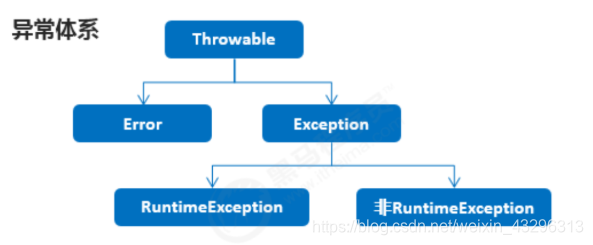
5.2JVM默认处理异常的方式
- 如果程序出现了问题,我们没有做任何处理,最终JVM 会做默认的处理,处理方式有如下两个步骤
- 把异常的名称,错误原因及异常出现的位置等信息输出在了控制台
- 程序停止执行
5.3try-catch方式处理异常
-
定义格式
try{ 可能出现异常的代码; }catch(异常类名 变量名) { 异常的处理代码; } -
执行流程
- 程序从 try 里面的代码开始执行
- 出现异常,就会跳转到对应的 catch 里面去执行
- 执行完毕之后,程序还可以继续往下执行
5.4Throwable成员方法
-
常用方法
方法名 说明 public String getMessage() 返回此 throwable 的详细消息字符串 public String toString() 返回此可抛出的简短描述 public void printStackTrace() 把异常的错误信息输出在控制台
5.5编译时异常和运行时异常的区别
- 编译时异常
- 都是Exception类及其子类
- 必须显示处理,否则程序就会发生错误,无法通过编译
- 运行时异常
- 都是RuntimeException类及其子类
- 无需显示处理,也可以和编译时异常一样处理
5.6throws方式处理异常
-
定义格式
public void 方法() throws 异常类名 { } -
注意事项
- 这个throws格式是跟在方法的括号后面的
- 编译时异常必须要进行处理,两种处理方案:try…catch …或者 throws,如果采用 throws 这种方案,将来谁调用谁处理
- 运行时异常可以不处理,出现问题后,需要我们回来修改代码
5.7throws和throw的区别
| throws | throw |
|---|---|
| 用在方法声明后面,跟的是异常类名 | 用在方法体内,跟的是异常对象名 |
| 表示抛出异常,由改方法的调用者来处理 | 表示抛出异常,由方法体内的语句处理 |
| 表示出现异常的一种可能性,并不一定会发生这些异常 | 执行throw一定抛出了某种异常 |

CSDN联合极客时间,共同打造面向开发者的精品内容学习社区,助力成长!
更多推荐



 0
0 0
0- 0


 已为社区贡献1条内容

所有评论(0)