Spring01-基本使用
一、spring入门1.1、spring简介Spring是一个开源框架,为简化企业级应用开发而生。使用Spring可以使简单的JavaBean实现以前只用EJB才能实现的功能。Spring是一个IOC(DI)和AOP容器框架。特点:1.轻量级:Spring 是非侵入性的 – 基于 Spring开发的应用中的对象可以不依赖于Spring 的API2.依赖注入 (DI — dependency inj
一、spring入门
1.1、spring简介
Spring是一个开源框架,为简化企业级应用开发而生。使用Spring可以使简单的JavaBean实现以前只用EJB才能实现的功能。
Spring是一个IOC(DI)和AOP容器框架。
特点:
1.轻量级:Spring 是非侵入性的 – 基于 Spring开发的应用中的对象可以不依赖于Spring 的API
2.依赖注入 (DI — dependency injection、IOC)
3.面向切面编程 AOP — aspect oriented programming)
4.容器:Spring是一个容器,因为它包含并且管理应用对象的生命周期
5.框架:Spring 实现了使用简单的组件配置组合成一个复杂的应用.在 Spring中可以使用XML 和 Java注解组合这些对象
6.一站式 :在 loC 和 AOP的基础上可以整合各种企业应用的开源框架和优秀的第三方类库(实际上 Spring 自身也提供了展现层的SpringMNc和持久层的Spring JDBC)
所谓一站式框架是指 Spring 有 JavaEE 开发的每一层解决方案。
- WEB层:SpringMVC
- Service层:Spring的Bean管理,声明式事务
- DAO层:Spring的JDBC模板,ORM模板
优点:
- IOC:方便解耦合
- AOP:对程序进行扩展
- 轻量级框架
- 方便与其他框架整合
Spring包括的模块
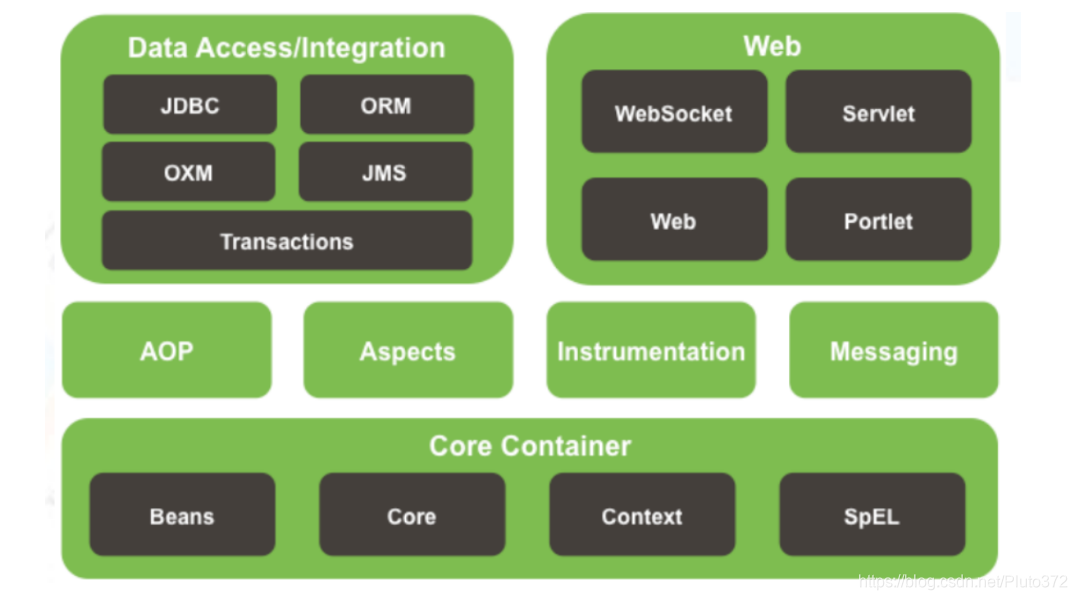
Spring 框架是一个分层架构,由 7 个定义良好的模块组成。Spring 模块构建在核心容器之上,核心容器定义了创建、配置和管理 bean 的方式 .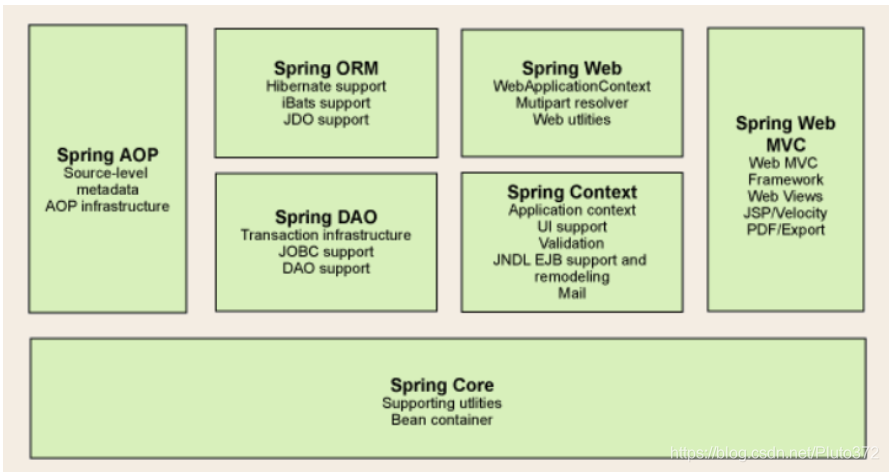
组成 Spring 框架的每个模块(或组件)都可以单独存在,或者与其他一个或多个模块联合实现。每个模块的功能如下:
- 核心容器:核心容器提供 Spring 框架的基本功能。核心容器的主要组件是 BeanFactory,它是工厂模式的实现。BeanFactory 使用控制反转(IOC) 模式将应用程序的配置和依赖性规范与实际的应用程序代码分开。
- Spring 上下文:Spring 上下文是一个配置文件,向 Spring 框架提供上下文信息。Spring 上下文包括企业服务,例如 JNDI、EJB、电子邮件、国际化、校验和调度功能。
- Spring AOP:通过配置管理特性,Spring AOP 模块直接将面向切面的编程功能 , 集成到了 Spring 框架中。所以,可以很容易地使 Spring 框架管理任何支持 AOP的对象。Spring AOP 模块为基于 Spring 的应用程序中的对象提供了事务管理服务。通过使用 Spring AOP,不用依赖组件,就可以将声明性事务管理集成到应用程序中。
- Spring DAO:JDBC DAO 抽象层提供了有意义的异常层次结构,可用该结构来管理异常处理和不同数据库供应商抛出的错误消息。异常层次结构简化了错误处理,并且极大地降低了需要编写的异常代码数量(例如打开和关闭连接)。Spring DAO 的面向 JDBC 的异常遵从通用的 DAO 异常层次结构。
- Spring ORM:Spring 框架插入了若干个 ORM 框架,从而提供了 ORM 的对象关系工具,其中包括 JDO、Hibernate 和 iBatis SQL Map。所有这些都遵从 Spring 的通用事务和 DAO 异常层次结构。
- Spring Web 模块:Web 上下文模块建立在应用程序上下文模块之上,为基于 Web 的应用程序提供了上下文。所以,Spring 框架支持与 Jakarta Struts 的集成。Web 模块还简化了处理多部分请求以及将请求参数绑定到域对象的工作。
- Spring MVC 框架:MVC 框架是一个全功能的构建 Web 应用程序的 MVC 实现。通过策略接口,MVC 框架变成为高度可配置的,MVC 容纳了大量视图技术,其中包括 JSP、Velocity、Tiles、iText 和 POI。
Spring Boot与Spring Cloud
- Spring Boot 是 Spring 的一套快速配置脚手架,可以基于Spring Boot 快速开发单个微服务;约定大于配置
- Spring Cloud 是 基于Spring Boot实现的;
- Spring Boot专注于快速、方便集成的单个微服务个体,Spring Cloud关注全局的服务治理框架;
- Spring Boot使用了约束优于配置的理念,很多集成方案已经帮你选择好了,能不配置就不配置 , Spring Cloud很大的一部分是基于Spring Boot来实现,Spring Boot可以离开Spring Cloud独立使用开发项目,但是Spring Cloud离不开Spring Boot,属于依赖的关系。
- SpringBoot在SpringClound中起到了承上启下的作用,如果你要学习SpringCloud必须要学习SpringBoot。
1.2 HelloWorld 第一个spring程序
1、因为spring的依赖包
<dependencies>
    <!-- https://mvnrepository.com/artifact/org.springframework/spring-context -->
    <dependency>
        <groupId>org.springframework</groupId>
        <artifactId>spring-context</artifactId>
        <version>5.2.12.RELEASE</version>
    </dependency>
    <!-- https://mvnrepository.com/artifact/org.springframework/spring-core -->
    <dependency>
        <groupId>org.springframework</groupId>
        <artifactId>spring-core</artifactId>
        <version>5.2.12.RELEASE</version>
    </dependency>
    <!-- https://mvnrepository.com/artifact/org.springframework/spring-beans -->
    <dependency>
        <groupId>org.springframework</groupId>
        <artifactId>spring-beans</artifactId>
        <version>5.2.12.RELEASE</version>
    </dependency>
</dependencies>
2、编写HelloWorld类
package com.zsn.beans;

public class HelloWorld {
    private String name;

    public String getName() {
        return name;
    }

    public void setName(String name) {
        this.name = name;
    }

    public  void sayHello(){
        System.out.println("helloword"+name);
    }
}
3、在resources文件夹中创建spring-1.xml的 spring 配置文件
<?xml version="1.0" encoding="UTF-8"?>
<beans xmlns="http://www.springframework.org/schema/beans"
       xmlns:xsi="http://www.w3.org/2001/XMLSchema-instance"
       xsi:schemaLocation="http://www.springframework.org/schema/beans http://www.springframework.org/schema/beans/spring-beans.xsd">

    <bean id="hello" class="com.zsn.beans.HelloWorld">
        <!-- 设置属性-->
        <property name="name" value="李四"></property>
    </bean>
</beans>
4、编写测试类
public class Test {
    public static void main(String[] args) {
        //1.创建ioc容器
        ApplicationContext context = new ClassPathXmlApplicationContext("spring-1.xml");
        HelloWorld hello = (HelloWorld)context.getBean("hello");
         hello.sayHello();
    }
}
二、IOC和DI
IOC(Inversion of Control)
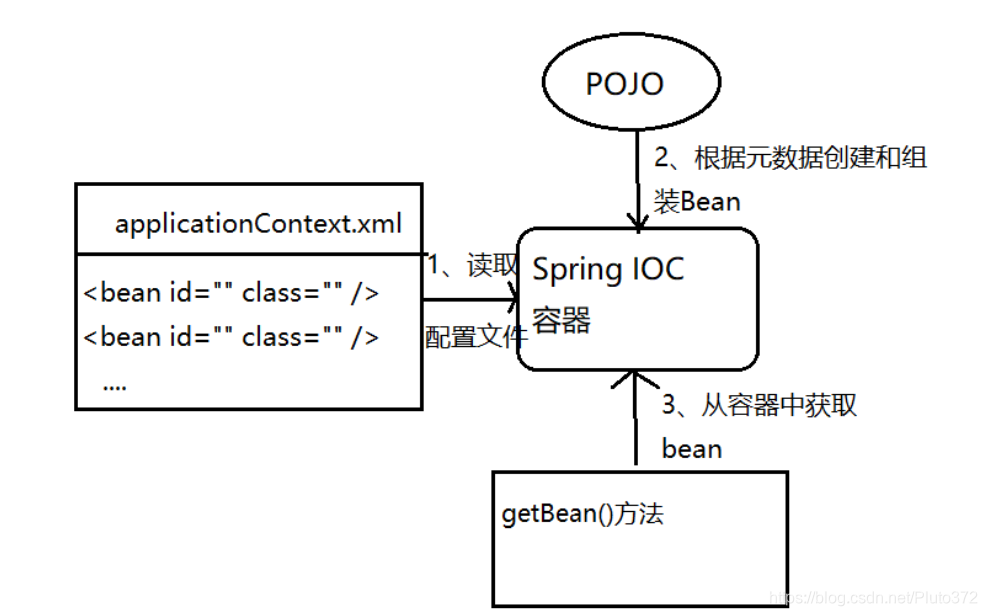
IOC是一种设计思想:翻转资源获取方向,Spring容器在初始化时先读取配置文件,根据配置文件或元数据创建与组织对象存入容器中,程序使用时再从Ioc容器中取出需要的对象。
DI(Dependency Injection)
**Dl(Dependency Injection)一IOC的另一种表述方式:**即组件以一些预先定义好的方式(例如: setter 方法)接受来自于容器的资源注入.相对于IOc而言,这种表述更直接
传统的资源查找方式要求组件向容器发起请求查找资源.作为回应,容器适时的返回资源.而应用了loC之后,则是容器主动地将资源推送给它所管理的组件,组件所要做的仅是选择一种合适的方式来接受资源.这种行为也被称为查找的被动形式。
Spring框架,作用是由 loc容器来管理bean,并且为我们的程序提供 bean 的实例。那么就需要完成三个工作:
1、怎么将bean放入到Ioc容器中;
2、怎么样创建IOC容器;
3、怎么样从IOC容器中获取bean?
2.2 Bean的基本配置
1、基本配置
<bean id="helloworld" class="com.zsn.beans.HelloWorld">
    <property name="name" value="王也"></property>
</bean>
说明:
1、id属性: bean的名称,在IoC容器中,bean的名称必须是唯一的。通常是类名小写
2、如果没有指定id属性,那么将会用class属性作为bean的名称。
3、Class属性:类的全名称(包名+类名)
2、创建IOC容器
在 Spring lOc容器读取 Bean 配置创建Bean实例之前,必须对它进行实例化.只有在容器实例化后,才可以从IoC容器里获取 Bean实例并使用.(要获取 bean就必须要先实例化Ioc容器,然后从容器中获取bean)
2.1:BeanFactory------Spring 内部使用
2.2: ApplicationContext:我们使用
	- ClassPathXmlApplicationContext -- 配置文件从类路径中加载 (常用)
	- FileSystemXmlApplicationContext -- 从文件系统中加载配置文件
ApplicationContext在初始化上下文时就实例化所有单例的 Bean。(默认spirng容器中的 bean都是单例对象)
ConfigurableApplicationContext扩展于ApplicationContext,新增加两个主要方法: refresh()和close(),让 ApplicationContext具有启动、刷新和关闭上下文的能力
2.3 创建ioc容器:
//1.创建ioc容器
ApplicationContext context = new ClassPathXmlApplicationContext("spring-1.xml");
3、从IOC容器中获取bean
调用ApplicationContext 的getBean()方法
getbean ( )方法的参数:
- String:根据配置文件中的ID属性来获取bean
-  Class:根据对象的类型来获取 bean。注意:如果只指定要返回的Bean 的类型就想从loC容器中取得 Bean 的前提是该类型的Bean在 loc容器中只有一个。
2.3 依赖注入
所谓依赖注入:通过配置文件,构造方法等向bean 的属性中注入值。在Spring 中依赖注入有三种方式。通过属性注入 ; 通过构造方法注入 ; 通过工厂方法注入
1、属性注入
属性注入即通过setter方法注入Bean的属性值或者依赖的对象
属性注入使用元素,使用name 属性指定 Bean 的属性名称,value 属性或子节点指定属性值。属性注入是实际应用中最常用的注入方式
<bean id="helloworld" class="com.zsn.beans.HelloWorld">
    <property name="name" value="王也"></property>
</bean>
向这个bean的name属性注入值:“王也”
2、构造方法注入
示例一:
<! --使用构造方法注入值-->
<bean id="student" class="com.zsn.beans.Student">
	<constructor-arg value="王也"></constructor-arg>
 	<constructor-arg value="男"></constructor-arg>
 	<constructor-arg value="20"></constructor-arg>
 </ bean>
注意:在配置文件中的constructor-arg 节点的顺序要和构造方法中参数的顺序一致(设置的参数个数与构造方法中的参数数量一致)
**示例二:**按照index来匹配构造方法的参数
<! --按照index来匹配构造方法的参数-->
<bean id="student" class="com.zsn.beans.Student">
	<constructor-arg value="王也" index="0"></constructor-arg>
 	<constructor-arg value="20" index="2"></constructor-arg>
    <constructor-arg value="男" index="1"></constructor-arg>
 </ bean>
说明:构造方法中的参数顺序与Index顺序相对应
**示例三:**按照参数名称匹配输入参数 (推荐)
<! --使用构造方法注入值-->
<bean id="student" class="com.zsn.beans.Student">
	<constructor-arg name="name" value="王也"></constructor-arg>
 	<constructor-arg name="gender" value="男"></constructor-arg>
 	<constructor-arg name="age" value="20"></constructor-arg>
 </ bean>
3 、扩展
Address.java
 public class Address {

     private String address;

     public String getAddress() {
         return address;
     }
     public void setAddress(String address) {
         this.address = address;
     }
 }
Student.java
public class Student {
     private String name;
     private Address address;
     private String[] books;
     private List<String> hobbys;
     private Map<String,String> card;
     private Set<String> games;
     private String wife;
     private Properties info;

     public void setName(String name) {
       this.name = name;
     }
     public void setAddress(Address address) {
         this.address = address;
     }
     public void setBooks(String[] books) {
         this.books = books;
     }

     public void setHobbys(List<String> hobbys) {
         this.hobbys = hobbys;
     }
     public void setCard(Map<String, String> card) {
    	  this.card = card;
     }
     public void setGames(Set<String> games) {
         this.games = games;
     }
     public void setWife(String wife) {
         this.wife = wife;
     }
     public void setInfo(Properties info) {
         this.info = info;
     }
     }
 }
1、Bean注入
注意点:这里的值是一个引用,ref
 <bean id="addr" class="com.zsn.pojo.Address">
     <property name="address" value="四川"/>
 </bean>

 <bean id="student" class="com.zsn.pojo.Student">
     <property name="name" value="张灵玉"/>
     <property name="address" ref="addr"/>
 </bean>
可以使用内部bean:
	- 可以不用id
	- 不能在其他地方使用
内部bean:
 <bean id="student" class="com.zsn.pojo.Student">
     <property name="name" value="张灵玉"/>
     <property name="address">
     	<bean class="com.zsn.pojo.Address">
         <property name="address" value="四川"/>
         </bean>
     </property>
 </bean>
2、数组注入
 <bean id="student" class="com.zsn.pojo.Student">
  <property name="name" value="张灵玉"/>
     <property name="address" ref="addr"/>
     <property name="books">
         <array>
             <value>西游记</value>
             <value>红楼梦</value>
             <value>水浒传</value>
         </array>
     </property>
 </bean>
3、List注入
 <property name="hobbys">
     <list>
  		 <value>听歌</value>
         <value>看电影</value>
         <value>爬山</value>
     </list>
 </property>
4、Map注入
 <property name="card">
     <map>
         <entry key="中国邮政" value="456456456465456"/>
         <entry key="建设银行" value="1456682255511"/>
   </map>
 </property>
5、set注入
 <property name="games">
    <set>
         <value>LOL</value>
         <value>BOB</value>
         <value>COC</value>
     </set>
 </property>
6、Null注入
<property name="wife"><null/></property>
7、Properties注入
 <property name="info">
     <props>
         <prop key="学号">20190604</prop>
         <prop key="性别">男</prop>
         <prop key="姓名">张灵玉</prop>
     </props>
 </property>
8、p命名和c命名注入
Student.java
import lombok.Data;
@Data
public class Student {
    private String name;
    private String gender;
    private int age;

    public Student(String name, String gender, int age) {
        this.name = name;
        this.gender = gender;
        this.age = age;
    }
    public Student() {
    }
}
(1)、P命名空间注入 : 需要在头文件中加入约束文件
导入约束 : xmlns:p="http://www.springframework.org/schema/p"
config.xml
<?xml version="1.0" encoding="UTF-8"?>
<beans xmlns="http://www.springframework.org/schema/beans"
       xmlns:xsi="http://www.w3.org/2001/XMLSchema-instance"

       xmlns:p="http://www.springframework.org/schema/p"

       xsi:schemaLocation="http://www.springframework.org/schema/beans http://www.springframework.org/schema/beans/spring-beans.xsd">

    <!--p命名空间注入,可以直接注入属性的值:property-->
    <bean class="com.zsn.pojo.Student" id="student" p:age="18" p:name="张楚岚" p:gender="男"/>
</beans>
(2)、c 命名空间注入 : 需要在头文件中加入约束文件
导入约束 : xmlns:c="http://www.springframework.org/schema/c"
config.xml
<?xml version="1.0" encoding="UTF-8"?>
<beans xmlns="http://www.springframework.org/schema/beans"
       xmlns:xsi="http://www.w3.org/2001/XMLSchema-instance"

       xmlns:c="http://www.springframework.org/schema/c"

       xsi:schemaLocation="http://www.springframework.org/schema/beans http://www.springframework.org/schema/beans/spring-beans.xsd">

    <!--c命名空间注入,通过构造器注入:construct-args-->
    <bean class="com.zsn.pojo.Student" id="student" c:gender="男" c:age="18" c:name="张灵玉" />
</beans>
10、字面值
如果注入的值中包含一些特殊字符,例如<>等。那么需要将其放入到<![CDATA[..]]>中
例:
<bean id="student" class="com.zsn.pojo.Student">
    <property name="name" value="王也">
    <value><![CDATA[<张三>]]></value>
    </property>
</bean>
输出name 就为 <张三>
三、Bean的作用域
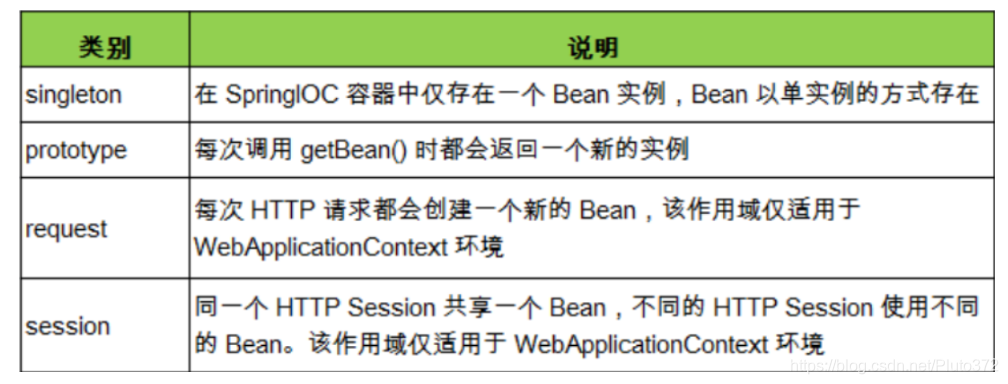
在Spring 中,可以在元素的scope 属性里设置 Bean 的作用域.
默认情况下,Spring只为每个在 IOC 容器里声明的 Bean创建唯一一个实例,整个I0C容器范围内都能共享该实例:所有后续的getBean()调用和 Bean引用都将返回这个唯一的 Bean 实例.该作用域被称为singleton,它是所有Bean的默认作用域.
3.1 singleton
<bean class="com.zsn.pojo.Student" id="student" c:gender="男" c:age="18" c:name="张灵玉" scope="singleton" />
java
public class Test {
    public static void main(String[] args) {
        //1.创建ioc容器
        ApplicationContext context = new ClassPathXmlApplicationContext("spring-1.xml");
        Student student = (Student)context.getBean("student");
        Student student1 = (Student)context.getBean("student");
        System.out.println(student==student1);
    }
}
输出结果为:true
说明:scope="singleton”可以省略。Spring 默认的scope就是singleton 。(单例模式)
3.2 prototype
<bean class="com.zsn.pojo.Student" id="student" c:gender="男" c:age="18" c:name="张灵玉" scope="prototype" />
java
public class Test {
    public static void main(String[] args) {
        //1.创建ioc容器
        ApplicationContext context = new ClassPathXmlApplicationContext("spring-1.xml");
        Student student = (Student)context.getBean("student");
        Student student1 = (Student)context.getBean("student");
        System.out.println(student==student1);
    }
}
输出结果为:false
说明:每次从容器中get的时候,都会产生一个新的对象!
3.3 其他
其余的request、session、application、这些只能在web开发中使用到
四、Bean的自动装配
Spring loC容器可以自动装配 Bean.需要做的仅仅是在的 autowire属性里指定自动装配的模式
- byType(根据类型自动装配):若IOC容器中有多个与目标 Bean类型一致的 Bean.在这种情况下,Spring 将无法判定哪个Bean最合适该属性,所以不能执行自动装配.
- byName(根据名称自动装配):必须将目标 Bean的名称和属性名设置的完全相同.
- constructor(通过构造器自动装配):当 Bean中存在多个构造器时,此种自动装配方式将会很复杂.不推荐使用
4.1 byName
1、新建两个实体类,Cat Dog 都有一个叫的方法
public class Cat {
    public void shout() {
        System.out.println("miao~");
    }
}
public class Dog {
    public void shout() {
        System.out.println("wang~");
    }
}
2、新建一个用户类 User
import lombok.Data;
@Data
public class User {
    private Cat cat;
    private Dog dog;
    private String name;
}
3、编写Spring配置文件
<?xml version="1.0" encoding="UTF-8"?>
<beans xmlns="http://www.springframework.org/schema/beans"
       xmlns:xsi="http://www.w3.org/2001/XMLSchema-instance"
       xsi:schemaLocation="http://www.springframework.org/schema/beans
       http://www.springframework.org/schema/beans/spring-beans.xsd">

    <bean id="dog" class="com.zsn.pojo.Dog"/>
    <bean id="cat" class="com.zsn.pojo.Cat"/>
    <bean id="user" class="com.zsn.pojo.User">
        <property name="cat" ref="cat"/>
        <property name="dog" ref="dog"/>
        <property name="name" value="王也"/>
    </bean>
</beans>
4、测试
public class MyTest {
    @Test
    public void testMethodAutowire() {
        ApplicationContext context = new ClassPathXmlApplicationContext("beans.xml");
        User user = (User) context.getBean("user");
        user.getCat().shout();
        user.getDog().shout();
    }
}
结果正常输出。
使用自动装配:
编写Spring配置文件:
<bean id="user" class="com.zsn.pojo.User" autowire="byName">
    <property name="name" value="王也"/>
</bean>
再次测试,结果依旧成功输出!
-
我们将 cat 的bean id修改为 catXXX
-
再次测试, 执行时报空指针java.lang.NullPointerException。因为按byName规则找不对应set方法,真正的setCat就没执行,对象就没有初始化,所以调用时就会报空指针错误。
小结:
当一个bean节点带有 autowire byName的属性时。
- 将查找其类中所有的set方法名,例如setCat,获得将set去掉并且首字母小写的字符串,即cat。
- 去spring容器中寻找是否有此字符串名称id的对象。
- 如果有,就取出注入;如果没有,就报空指针异常。
4.2 byType
autowire byType (按类型自动装配)
使用autowire byType首先需要保证:同一类型的对象,在spring容器中唯一。如果不唯一,会报不唯一的异常。
NoUniqueBeanDefinitionException
测试:
1、将user的bean配置修改一下 : autowire=“byType”
2、测试,正常输出
3、在注册一个cat 的bean对象!
<?xml version="1.0" encoding="UTF-8"?>
<beans xmlns="http://www.springframework.org/schema/beans"
       xmlns:xsi="http://www.w3.org/2001/XMLSchema-instance"
       xsi:schemaLocation="http://www.springframework.org/schema/beans
       http://www.springframework.org/schema/beans/spring-beans.xsd">

    <bean id="dog" class="com.zsn.pojo.Dog"/>
    <bean id="cat" class="com.zsn.pojo.Cat"/>
	<bean id="cat2" class="com.zsn.pojo.Cat"/>

    <bean id="user" class="com.zsn.pojo.User" autowire="byName">
        <property name="name" value="王也"/>
    </bean>
</beans>
测试,报错:NoUniqueBeanDefinitionException
5、删掉cat2,将cat的bean名称改掉!测试!因为是按类型装配,所以并不会报异常,也不影响最后的结果。甚至将id属性去掉,也不影响结果。这就是按照类型自动装配!
4.3 自动装配的优缺点
在 Bean配置文件里设置autowire 属性进行自动装配将会装配 Bean的所有属性.然而,若只希望装配个别属性时, autowire属性就不够灵活了.
autowire属性要么根据类型自动装配,要么根据名称自动装配,不能两者兼而有之.
一般情况下,在实际的项目中很少使用自动装配功能(配置文件中的自动装配),因为和自动装配功能所带来的好处比起来,明确清晰的配置文档更有说服力一些。

CSDN联合极客时间,共同打造面向开发者的精品内容学习社区,助力成长!
更多推荐



 1
1 0
0- 0


 已为社区贡献1条内容

所有评论(0)