书写简易spring mvc框架版本1
·
springmvc简易框架(项目中肯定不能用,只是为了了解原理)的实现思路如下:
手写spring框架
1.配置阶段
- 配置web.xml DispatcherServlet
- 设定init-param contextConfigLoacation = classpath:application.xml
- 设定url-pattern /*
- 配置Annotation @Controller @Service @Autowirted @RequestMapping …
2.初始化阶段
- 调用init()方法 加载配置文件
- IOC容器初始化 Map<String,Object>
- 扫描相关的类 scan-package=“com.hfl.demo”
- ioc:创建实例化并保存至容器 通过反射机制将类实例化放入IOC容器中
- DI:进行DI操作:扫描IOC容器中的实例,给没有赋值的属性自动赋值
3.运行阶段
- 调用doPost()/doGet() - Web容器调用doPost/doGet方法,获得request/response对象
- 匹配HandlerMapping - 从request对象中获得用户输入的url,找到其对应的Method
- 反射调用method.invoker() - 利用反射调用方法并返回结果
- response.getWrite().write - 将返回结果输出到浏览器
代码部分
1.配置阶段
web.xml
<?xml version="1.0" encoding="UTF-8"?>
<web-app xmlns="http://xmlns.jcp.org/xml/ns/javaee"
         xmlns:xsi="http://www.w3.org/2001/XMLSchema-instance"
         xsi:schemaLocation="http://xmlns.jcp.org/xml/ns/javaee http://xmlns.jcp.org/xml/ns/javaee/web-app_4_0.xsd"
         version="4.0">
    <display-name>Gupao Web Application</display-name>
    <servlet>
        <servlet-name>hflmvc</servlet-name>
        <servlet-class>com.hfl.mvcframework.servlet.v1.HfDispatcherServlet</servlet-class>
        <init-param>
            <param-name>contextConfigLocation</param-name>
            <param-value>application.properties</param-value>
        </init-param>
        <load-on-startup>1</load-on-startup>
    </servlet>
    <servlet-mapping>
        <servlet-name>hflmvc</servlet-name>
        <url-pattern>/*</url-pattern>
    </servlet-mapping>
</web-app>
包结构:
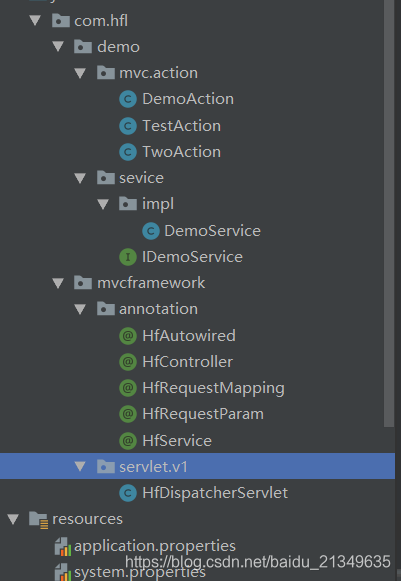
application.properties
scanPackage=com.hfl.demo
配置注解
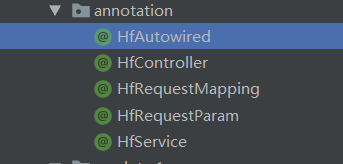
@Target({ElementType.FIELD})
@Retention(RetentionPolicy.RUNTIME)
@Documented
public @interface HfAutowired {
    String value() default "";
}
其他注解类相同,只是注解名不一样.
初始化阶段
HfDispatcherServlet
package com.hfl.mvcframework.servlet.v1;

import com.hfl.mvcframework.annotation.HfAutowired;
import com.hfl.mvcframework.annotation.HfController;
import com.hfl.mvcframework.annotation.HfRequestMapping;
import com.hfl.mvcframework.annotation.HfService;

import javax.servlet.ServletConfig;
import javax.servlet.ServletException;
import javax.servlet.http.HttpServlet;
import javax.servlet.http.HttpServletRequest;
import javax.servlet.http.HttpServletResponse;
import java.io.File;
import java.io.IOException;
import java.io.InputStream;
import java.lang.reflect.Field;
import java.lang.reflect.InvocationTargetException;
import java.lang.reflect.Method;
import java.net.URL;
import java.util.Arrays;
import java.util.HashMap;
import java.util.Map;
import java.util.Properties;

/**
 * Title: HfDispatcherServlet
 * Description: TODO
 *
 * @author hfl
 * @version V1.0
 * @date 2020-06-17
 */
//所有的核心逻辑全部写在一个init()方法中。
public class HfDispatcherServlet extends HttpServlet {
    private Map<String, Object> mapping = new HashMap<String, Object>();


    @Override
    public void init(ServletConfig config) throws ServletException {
        //读取初始化参数中的 配置文件信息(为了获取扫描的基础包名)
        InputStream is = null;
        try {
            Properties configContext = new Properties();
            is = this.getClass().getClassLoader().getResourceAsStream(config.getInitParameter("contextConfigLocation"));
            configContext.load(is);
            String scanPackage = configContext.getProperty("scanPackage");
            // 扫描包下的类 加入容器中
            doScanner(scanPackage);
            //注入bean带注解的bean 并初始化
            for (String className : mapping.keySet()) {
                if (!className.contains(".")) {
                    continue;
                }
                Class<?> clazz = Class.forName(className);
                //将<url,method>加入到mapping中
                if (clazz.isAnnotationPresent(HfController.class)) {
                    mapping.put(className, clazz.newInstance());
                    String baseUrl = "";
                    if (clazz.isAnnotationPresent(HfRequestMapping.class)) {
                        HfRequestMapping requestMapping = clazz.getAnnotation(HfRequestMapping.class);
                        baseUrl = requestMapping.value();
                    }
                    //如果controller下的方法有 路径,则拼接到 map的value中去
                    Method[] methods = clazz.getMethods();
                    for (Method method : methods) {
                        if (!method.isAnnotationPresent(HfRequestMapping.class)) {
                            continue;
                        }
                        HfRequestMapping requestMapping = method.getAnnotation(HfRequestMapping.class);
                        String url = (baseUrl + "/" + requestMapping.value()).replaceAll("/+", "/");
                        mapping.put(url, method);
                        System.out.println("Mapped " + url + "," + method);
                    }
                } else if (clazz.isAnnotationPresent(HfService.class)) {
                    //注解中有别名 有别名替换key
                    HfService service = clazz.getAnnotation(HfService.class);
                    String beanName = service.value();
                    if (!"".equals(beanName)) {
                        beanName = clazz.getName();
                    }
                    //初始化bean
                    Object instance = clazz.newInstance();
                    mapping.put(beanName, instance);
                    //将service实现的接口也注入到bean中
                    for (Class<?> i : clazz.getInterfaces()) {
                        mapping.put(i.getName(), instance);
                    }
                }
            }
            //根据 autowired实例化bean 这里只实现了controller层的注入
            for (Object object : mapping.values()) {
                if (object == null) {
                    continue;
                }
                Class<?> clazz = object.getClass();
                if (clazz.isAnnotationPresent(HfController.class)) {
                    Field[] fields = clazz.getDeclaredFields();
                    for (Field field : fields) {
                        if (!field.isAnnotationPresent(HfAutowired.class)) {
                            continue;
                        }
                        HfAutowired autowired = field.getAnnotation(HfAutowired.class);
                        String beanName = autowired.value();
                        if ("".equals(beanName)) {
                            beanName = field.getType().getName();
                        }
                        field.setAccessible(true);
                        try {
                            field.set(mapping.get(clazz.getName()), mapping.get(beanName));
                        } catch (Exception e) {
                            e.printStackTrace();
                        }

                    }
                }
            }
        } catch (Exception e) {

        }
    }


    /**
     * 扫描包下的类 加入容器中
     *
     * @param scanPackage
     */
    private void doScanner(String scanPackage) {
        // 将包路径转成url路径
        URL url = this.getClass().getClassLoader().getResource("/" + scanPackage.replaceAll("\\.", "/"));
        File classFile = new File(url.getFile());
        //遍历文件下的所有子文件 加入到容器中
        for (File file : classFile.listFiles()) {
            //如果是文件夹 递归继续遍历,如果不是则将类加入到容器中
            if (file.isDirectory()) {
                //递归扫描
                doScanner(scanPackage + "." + file.getName());
            } else {
                //如果不是class文件 则继续跳过循环
                if (!file.getName().endsWith(".class")) {
                    continue;
                }
                String className = (scanPackage + "." + file.getName()).replace(".class", "");
                //将类名作为key 加入到map集合中
                mapping.put(className, null);
            }
        }
    }

}
3.运行阶段
HfDispatcherServlet
  @Override
    public void doGet(HttpServletRequest req, HttpServletResponse resp) throws ServletException, IOException {

        try {
            doDispatch(req, resp);
        } catch (Exception e) {
            resp.getWriter().write("500 Exception " + Arrays.toString(e.getStackTrace()));
        }
    }

    @Override
    public void doPost(HttpServletRequest req, HttpServletResponse resp) throws ServletException, IOException {
        doGet(req, resp);
    }

    private void doDispatch(HttpServletRequest req, HttpServletResponse resp) throws IOException, InvocationTargetException, IllegalAccessException {
        //请求的url
        String url = req.getRequestURI();
        String contextPath = req.getContextPath();
        url = url.replace(contextPath, "").replaceAll("/+", "/");
        if (!this.mapping.containsKey(url)) {
            resp.getWriter().write("404 Not Found!");
            return;
        }
        Method method = (Method) this.mapping.get(url);
        Map<String, String[]> params = req.getParameterMap();
        method.invoke(this.mapping.get(method.getDeclaringClass().getName()),  new Object[]{req, resp, params.get("name")[0]});
    }
测试
@HfController
@HfRequestMapping("/demo")
public class DemoAction {

  	@HfAutowired
	private IDemoService demoService;

	@HfRequestMapping("/query.*")
	public void query(HttpServletRequest req, HttpServletResponse resp,
                      @HfRequestParam("name") String name){
//		String result = demoService.get(name);
		String result = "My name is " + name;
		try {
			resp.getWriter().write(result);
		} catch (IOException e) {
			e.printStackTrace();
		}
	}
}
结果如下: 已经跳转到action中的方法中了。

这个版本很多东西都是写死的,主要为了了解整个扫描包,加入容器管理,初始化bean,请求url根据反射调用action的方法的逻辑。
完

CSDN联合极客时间,共同打造面向开发者的精品内容学习社区,助力成长!
更多推荐


 0
0 0
0- 0


 已为社区贡献2条内容

所有评论(0)