Day02JavaWeb【Servlet & ServletContext】Servlet精讲(1)
学习目标能够理解Servlet技术概述能够独立写出Servlet的入门程序能够说出servlet执行流程能够应用的配置能够使用Junit与TDD开发能够使用servletcontext域对象能够写出统计网站访问次数的代码Servlet的概述***(1)什么是ServletServlet 运行在服务端的Java小程序,是sun公司提供一套规范(接口)用来处理客户端请求、响应给浏览器的动
学习目标
能够理解Servlet技术概述
能够独立写出Servlet的入门程序
能够说出servlet执行流程
能够应用的配置
能够使用Junit与TDD开发
能够使用servletcontext域对象
能够写出统计网站访问次数的代码
Servlet的概述***
(1)什么是Servlet
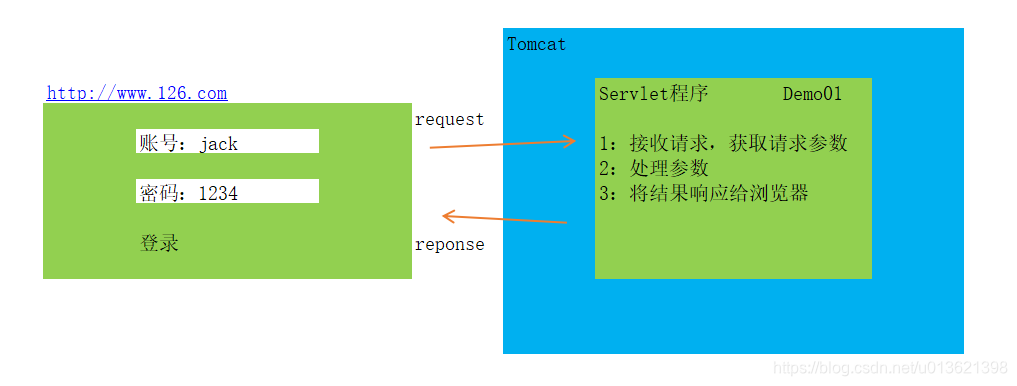
Servlet 运行在服务端的Java小程序,是sun公司提供一套规范(接口)
用来处理客户端请求、响应给浏览器的动态资源。
Servlet是JavaWeb三大组件之一(Servlet、Filter、Listener),且最重要。
(2)Servlet的作用
用来处理从客户端发送过来的请求,并对该请求作出响应。
Servlet的任务有:
1.获取请求数据
2.处理请求
3.完成响应
重点理解有什么用 比 是什么更重要!!!
注解设置访问路径
(1)什么是urlPatterns?
用来给Servlet设置访问路径
(2)两种设置方式
- 注解设置
@WebServlet 用来设置servlet的访问路径
变量可以有name urlPatterns value
但只有value可以省略变量名
- xml配置
src\com\wzx\Demo01Servlet.java
//注解:标记
 @WebServlet( "/demo01")  //1:访问地址
public class Demo01Servlet extends HttpServlet {  //2:调HttpServlet中的service方法
    //3:HttpServlet中的service方法调用你写的doGet/doPost
    protected void doPost(HttpServletRequest request, HttpServletResponse response) throws ServletException, IOException {
                //项目写法
                doGet(request,response);
    }

    protected void doGet(HttpServletRequest request, HttpServletResponse response) throws ServletException, IOException {
        System.out.println("doGet");
    }
}
Servlet传统配置方式(了解)
(1)本质就是xml配置
(2)在项目中xml配置用的少
步骤
- (1)删除注解,注解与配置只能有一个
//注解:标记
  //1:访问地址
public class Demo01Servlet extends HttpServlet {  //2:调HttpServlet中的service方法
    //3:HttpServlet中的service方法调用你写的doGet/doPost
    protected void doPost(HttpServletRequest request, HttpServletResponse response) throws ServletException, IOException {
                //项目写法
                doGet(request,response);
    }

    protected void doGet(HttpServletRequest request, HttpServletResponse response) throws ServletException, IOException {
        System.out.println("doGet");
    }
}
- (2)在web.xml中设置url
web\WEB-INF\web.xml
<?xml version="1.0" encoding="UTF-8"?>
<web-app xmlns="http://xmlns.jcp.org/xml/ns/javaee"
         xmlns:xsi="http://www.w3.org/2001/XMLSchema-instance"
         xsi:schemaLocation="http://xmlns.jcp.org/xml/ns/javaee http://xmlns.jcp.org/xml/ns/javaee/web-app_4_0.xsd"
         version="4.0">
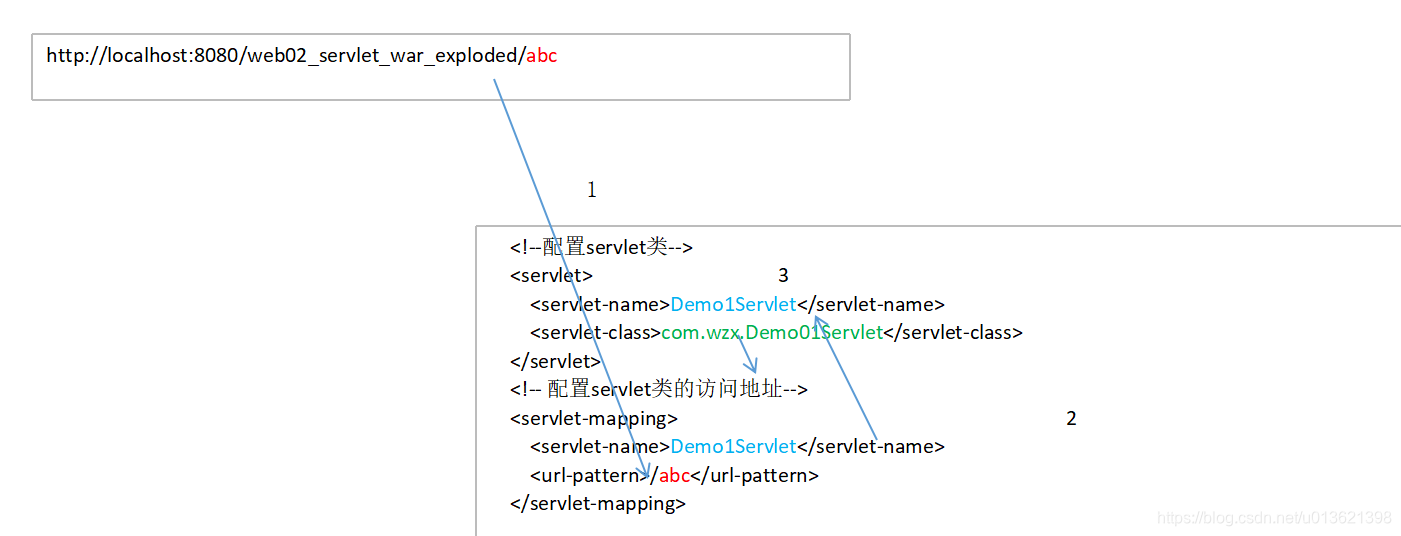
    <!--配置servlet类-->
    <servlet>
        <servlet-name>Demo1Servlet</servlet-name>
        <servlet-class>com.wzx.Demo01Servlet</servlet-class>
    </servlet>
    <!-- 配置servlet类的访问地址-->
    <servlet-mapping>
        <servlet-name>Demo1Servlet</servlet-name>
        <url-pattern>/abc</url-pattern>
    </servlet-mapping>

</web-app>
(3) 地址如何找到Servlet?

CSDN联合极客时间,共同打造面向开发者的精品内容学习社区,助力成长!
更多推荐



 1
1 0
0- 0


 已为社区贡献7条内容

所有评论(0)