python之爬虫实战
·
首先,关于爬虫你需要知道的事
一、爬虫做了哪几件事情
①根据URL发送请求到服务器,获取HTML文本
②解析HTML文本,把需要的数据挑出来
③从HTML中解析出超链接,继续爬取里面的页面
二、好坏爬虫
①robots.txt
爬取之前先查看有没有这个文档,是否允许你爬取该页面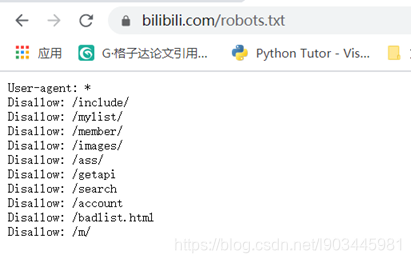
②API
可以找寻其API进行爬取
③抓取的频率
有的会限制你抓取的频率,总之频率不能过大
b站教学视频链接
如果对面向对象不清楚的可以查看这篇博客
如果对获取当前时间不清楚的可以查看这篇博客
代码编写:
import requests
from bs4 import BeautifulSoup
import csv
import datetime

url = 'https://www.bilibili.com/ranking'

response = requests.get(url)
html_text = response.text
#用BeautifulSoup解析
soup = BeautifulSoup(html_text,'html.parser')

#用来保存视频信息的对象
class Video:
	def __init__(self,rank,title,score,visit,comment,up,up_id,url):
		self.rank = rank
		self.title = title
		self.score = score
		self.visit = visit
		self.comment = comment
		self.up = up
		self.up_id = up_id
		self.url = url

	#实例方法 该方法依赖于具体的实例
	def to_csv(self):
		return [self.rank,self.title,self.score,self.visit,self.comment,self.up,self.up_id,self.url]
	#静态方法 该方法不依赖于具体的实例
	@staticmethod
	def csv_title():
		return ['排名','标题','分数','播放量','弹幕数','up主','up ip','url']


#提取列表
items = soup.findAll('li',{'class':'rank-item'}) #抓'li'标签,限制条件写在{}里
videos = []  #保存提取出来的Video列表

for itm in items:
	#抓取排名
	rank = itm.find('div',{'class':'num'}).text
	#抓取视频标题
	title = itm.find('a',{'class':'title'}).text
	#抓取综合得分
	score = itm.find('div',{'class':'pts'}).find('div').text
	#抓取播放量
	visit = itm.find_all('span',{'class':'data-box'})[0].text
	#抓取弹幕数
	comment = itm.find_all('span',{'class':'data-box'})[1].text
	#抓取up名字
	up_1 = itm.find_all('span',{'class':'data-box'})[2].text
	#另一种抓取up名字的方法
	up_2 = itm.find_all('a')[2].text
	#抓取up主id
	up_id = itm.find_all('a')[2].get('href')[len('//space.bilibili.com/'):]
	#抓取视频链接
	url = itm.find('a',{'class':'title'}).get('href')

	v = Video(rank.encode('GBK','ignore').decode('GBk'),
		title.encode('GBK','ignore').decode('GBk'),
		score.encode('GBK','ignore').decode('GBk'),
		visit.encode('GBK','ignore').decode('GBk'),
		comment.encode('GBK','ignore').decode('GBk'),
		up_1.encode('GBK','ignore').decode('GBk'),
		up_id.encode('GBK','ignore').decode('GBk'),
		url.encode('GBK','ignore').decode('GBk'))
	videos.append(v)

#为文件名添加时间戳
now_str = datetime.datetime.now().strftime('%Y%m%d_%H%M%S')
file_name = f'top100_{now_str}.csv'
#打开文件file_name,临时取名为f
#newline指定结束符
with open(file_name,'w',newline='') as f:
	pen = csv.writer(f)
	pen.writerow(Video.csv_title())
	for v in videos:
		pen.writerow(v.to_csv())
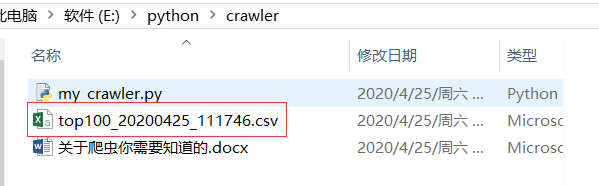
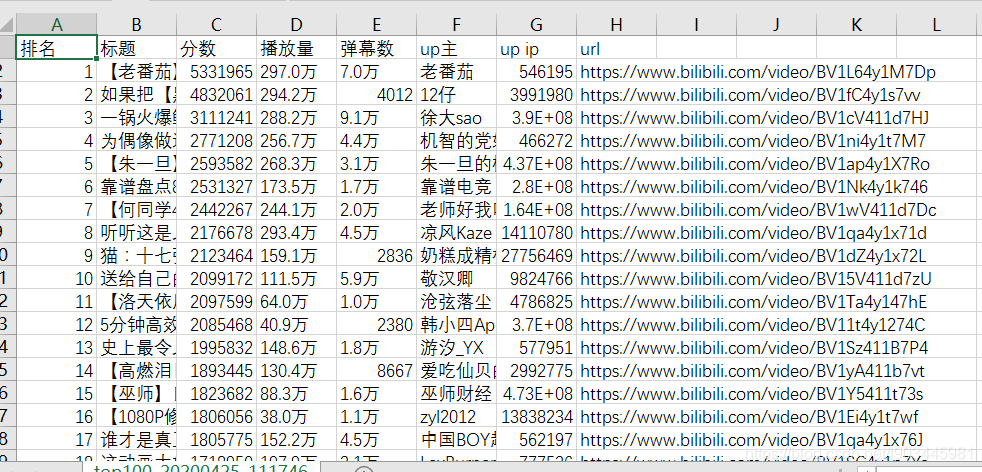
补充:
如果没有安装requests模块或者bs4模块,可以在命令行输入:
python -m pip install requests
python -m pip install bs4
加上python -m是为了下载符合你当前python版本的模块
pip下载速度慢可参考这篇文章

CSDN联合极客时间,共同打造面向开发者的精品内容学习社区,助力成长!
更多推荐


 1
1 0
0- 0


 已为社区贡献1条内容

所有评论(0)